


We recently received a “Do Not Sell My Personal Information” request on our own store, and it made us stop and think: if we had to double-check the steps, chances are other merchants might be running into the same challenges too.
With U.S. privacy laws like the California Consumer Privacy Act (CCPA/CPRA) and similar state laws now in effect, shoppers have the right to say: “Do not sell my personal information.”
Thankfully, to make handling these requests simple, the Consentmo app logs every “Do Not Sell” request in one place and, whenever possible, processes them automatically for you. This reduces manual work, cuts compliance stress, and gives you peace of mind that your store is following the rules.
In this article, we’ll explain how “Do Not Sell” requests work, where to find them, what’s automated, and when you’ll need to step in.
Quick Summary
- U.S. customers can request to opt out of data sharing/selling under CCPA/CPRA and other state laws.
- Consentmo automates most of the process by updating Shopify’s privacy settings and rejecting cookies.
- Requests come through the ‘Do Not Sell’ page on your storefront and are logged in the Customer Data Requests tab.
- These requests are normal compliance steps, not a sign of churn — they build trust and transparency with your customers.
What Is a “Do Not Sell” Request?
A “Do Not Sell My Personal Information” request allows U.S. customers to opt out of having their data shared with third parties. This is a core right under the CCPA/CPRA and other state privacy laws.
For merchants, this usually means:
- Stopping data from being shared with ad networks or analytics tools.
- Making sure Shopify’s privacy API is updated to reflect the customer’s choice.
- Excluding customers from certain marketing audiences if you’re on Shopify Plus.
It’s worth remembering: these requests are simply part of modern compliance.
They don’t signal that your customers dislike your brand - instead, they show that people today are more privacy-aware and want to make their own choices about how their data is used.
How “Do Not Sell” Requests Are Received
Customers can send “Do Not Sell” requests by email or chat - but it's best if you have a dedicated “Do Not Sell Or Share My Personal Information” page on your storefront.
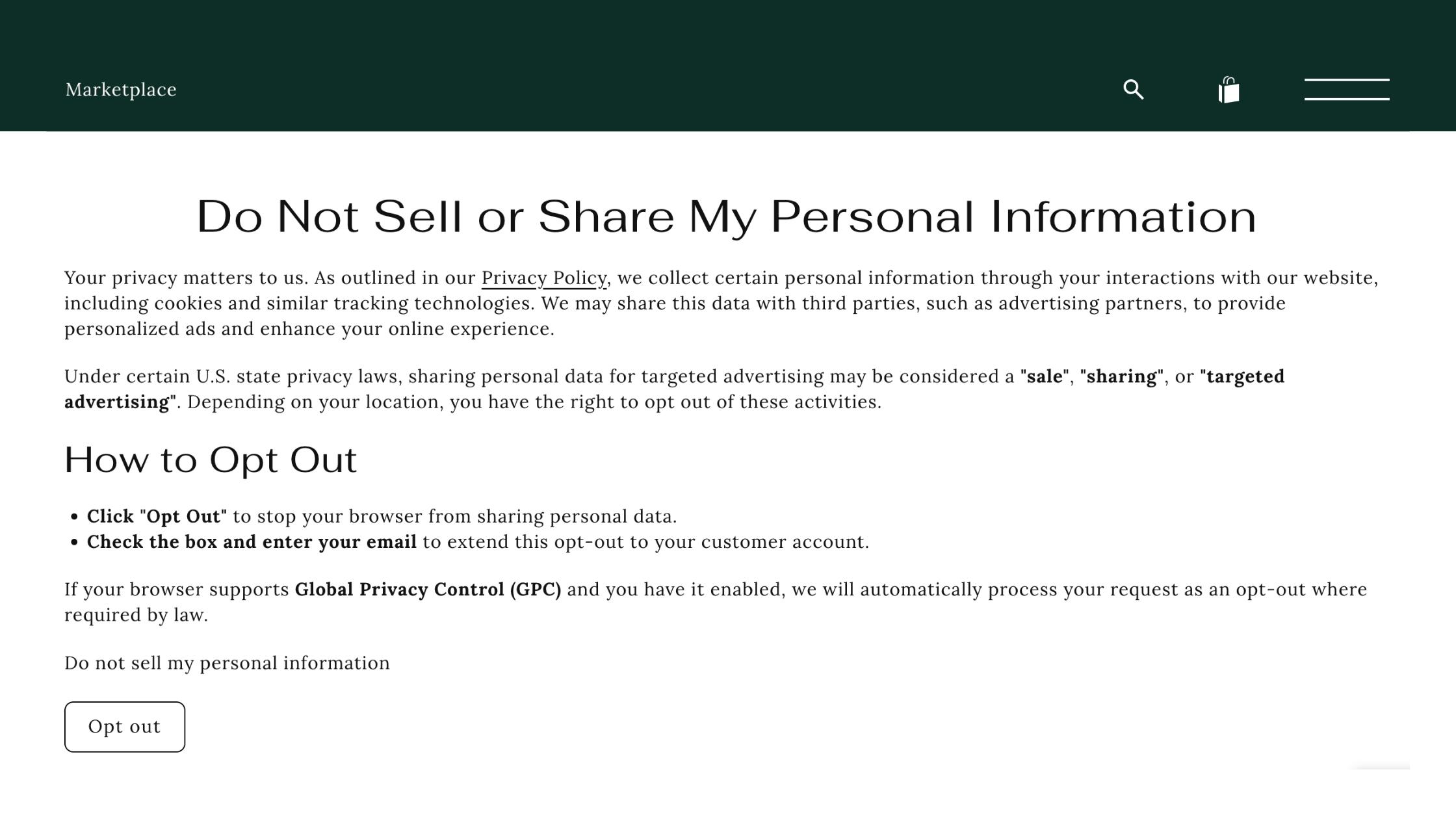
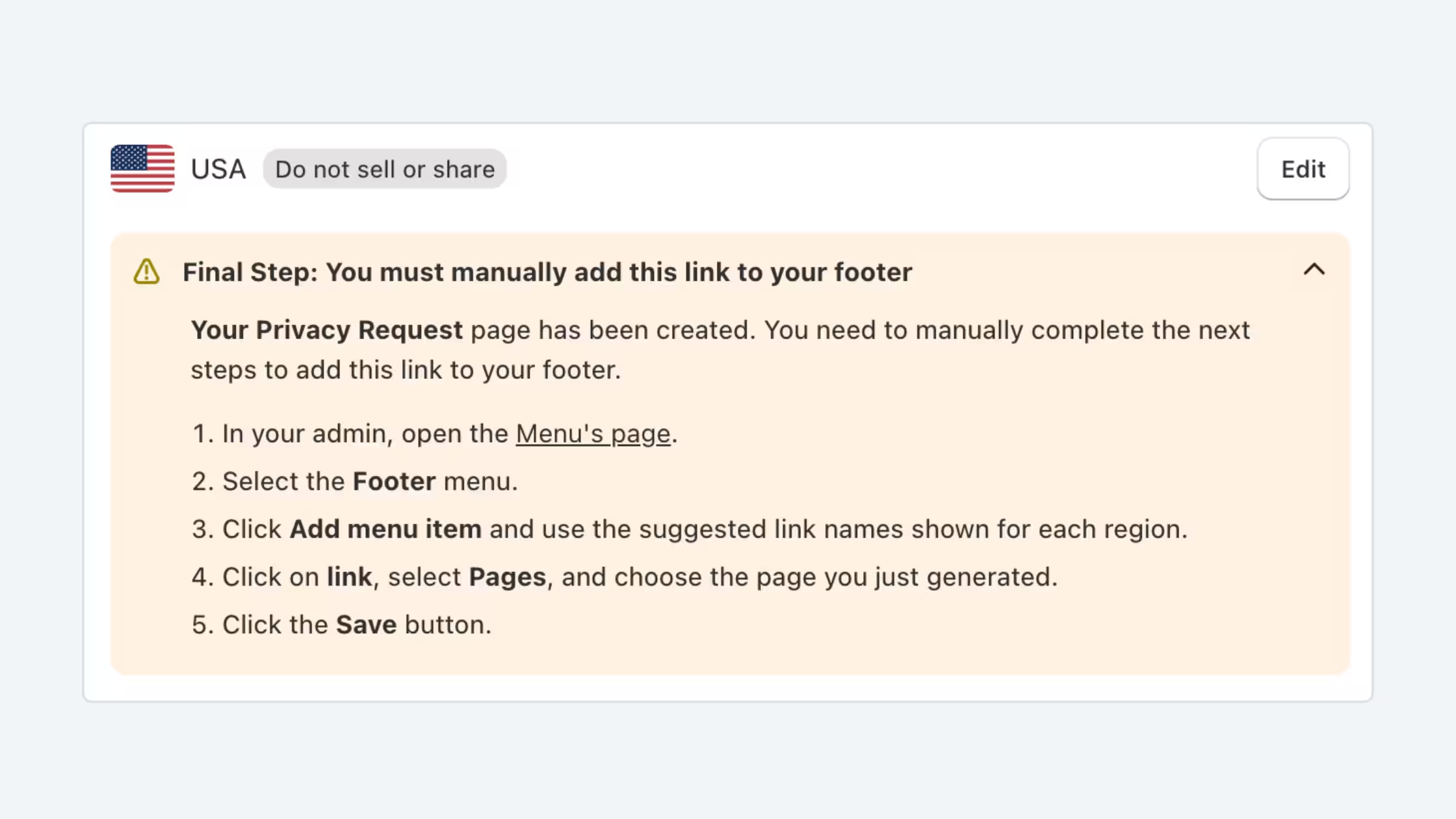
When you install the Consentmo app, this page can be generated automatically with a single click. All you need to do is:
- Install the Consentmo app.
- Navigate to Privacy center > Privacy request pages > Do Not Sell page.
- Click on the Generate button.
- Navigate to your Footer menu and link the new page there.
- Save the menu.
Once published, customers can easily find this page (usually in your site’s footer) and submit a request. From their perspective, it’s a simple form: they enter their email, confirm via a secure link, and they’re done.
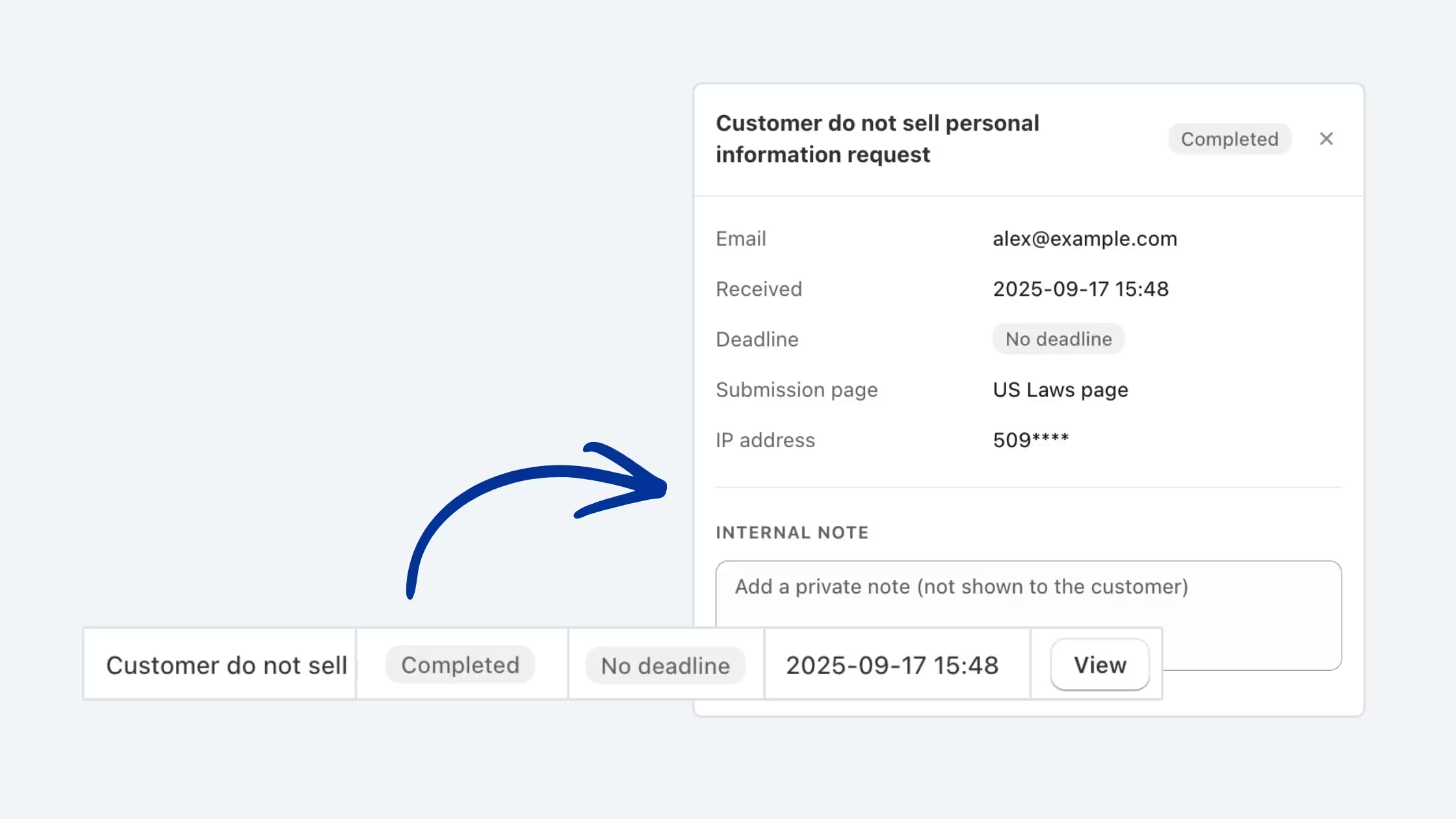
On your side, every request is automatically logged in Consentmo → Analytics & Reports → Customer data requests.
The best part: no coding, no setup headaches - just a quick page add, and your shop is fully compliant with CCPA/CPRA “Do Not Sell” requirements.
What’s Automatic and What Needs Your Attention
Most of the work for “Do Not Sell My Personal Information” requests happens automatically with Consentmo. Once a customer confirms their request, the app updates your store settings and logs it for you - no action needed.
The only times you may need to step in are:
- If you use Shopify Audiences (Shopify Plus), you’ll need to manually remove the customer.
- If you use third-party trackers like Facebook Pixel or Google Analytics, make sure those tools also respect the opt-out.
In short: Consentmo handles the main task, and you’ll only need to act in a couple of cases.
How Quickly Do I Need to Respond?
A common worry is: “Do I need to act on a request the moment it comes in?” The good news is no - you have time.
Here’s what the law says for “Do Not Sell” requests under CCPA/CPRA:
- You need to confirm you received the request within 10 business days.
- You have up to 45 days to complete it. If it’s more complex, you can extend by another 45 days, as long as you inform the customer.
In practice, you won’t get anywhere near those limits. With Consentmo + Shopify, most requests are processed automatically within minutes, so your store will almost always be compliant well before the deadline.
Where to Find and Track Customer Do Not Sell Requests
Once a request has been submitted and confirmed by the customer, it’s automatically logged in your Consentmo app.
You can find all requests by going to:
Cookie Manager tab → Customer Data Requests section
Here you’ll see a full list of every DSAR submitted to your store. To make things easier, you can:
- Filter by request type (Deletion, Do Not Sell, etc.)
- Sort requests to quickly find the ones you want to review
- Check status to see whether they’ve already been processed or still need action
- Detailed view which allows you to view all taken actions on the request so far
In addition to the app dashboard, you’ll also receive email notifications whenever a new request is made. These emails include a direct link to the customer profile in Shopify, so you can quickly check details without exploring around.
From the dedicated Consentmo app menu, you’ll always know what requests have come in and what’s happening with them.
5 Best Practices for Handling Customer Do Not Sell Requests
Consentmo automatically handles Do Not Sell or Share requests submitted through your privacy pages. When a customer opts out, their preference is recorded and the request is logged in the app, so you don’t need to manually process each request.
That said, it’s still useful to keep an eye on your privacy requests and the other tools connected to your store.
Here are a few good practices to follow:
- Review your customer requests regularly. Consentmo keeps a record of submitted Do Not Sell requests, including their status and submission details, giving you a clear history of customer privacy choices.
- Use filters to find requests quickly. Filter your request records by type, status, or other available criteria whenever you need to review a particular request.
- Check your third-party tools. Consentmo handles the request within its own privacy flow, but external advertising, analytics, audience, or marketing platforms may have their own privacy settings or integrations. Make sure these are configured to respect the customer’s choice as well.
- Keep an eye on notifications and records. When privacy requests are submitted, Consentmo helps keep you informed through the app so you can monitor activity without manually tracking every request.
- Be ready to answer customer questions. If someone contacts you about their request, you can refer to the recorded request and status in Consentmo to confirm that their preference has been received and processed.
Customers Can Also Opt Back In to Data Sales or Sharing
Privacy preferences can change, so Consentmo also gives customers the option to opt back in after previously opting out of the sale or sharing of their personal information.
After a customer opts out, the privacy page can display an “Allow my data to be shared” option. If they choose it, Consentmo records a new request reflecting their updated preference and notifies both the customer and the merchant.
This option is available through the Do Not Sell page, US Privacy Requests page, and Smart Privacy Center, giving customers an easy way to manage their privacy choice without needing to contact the merchant directly.
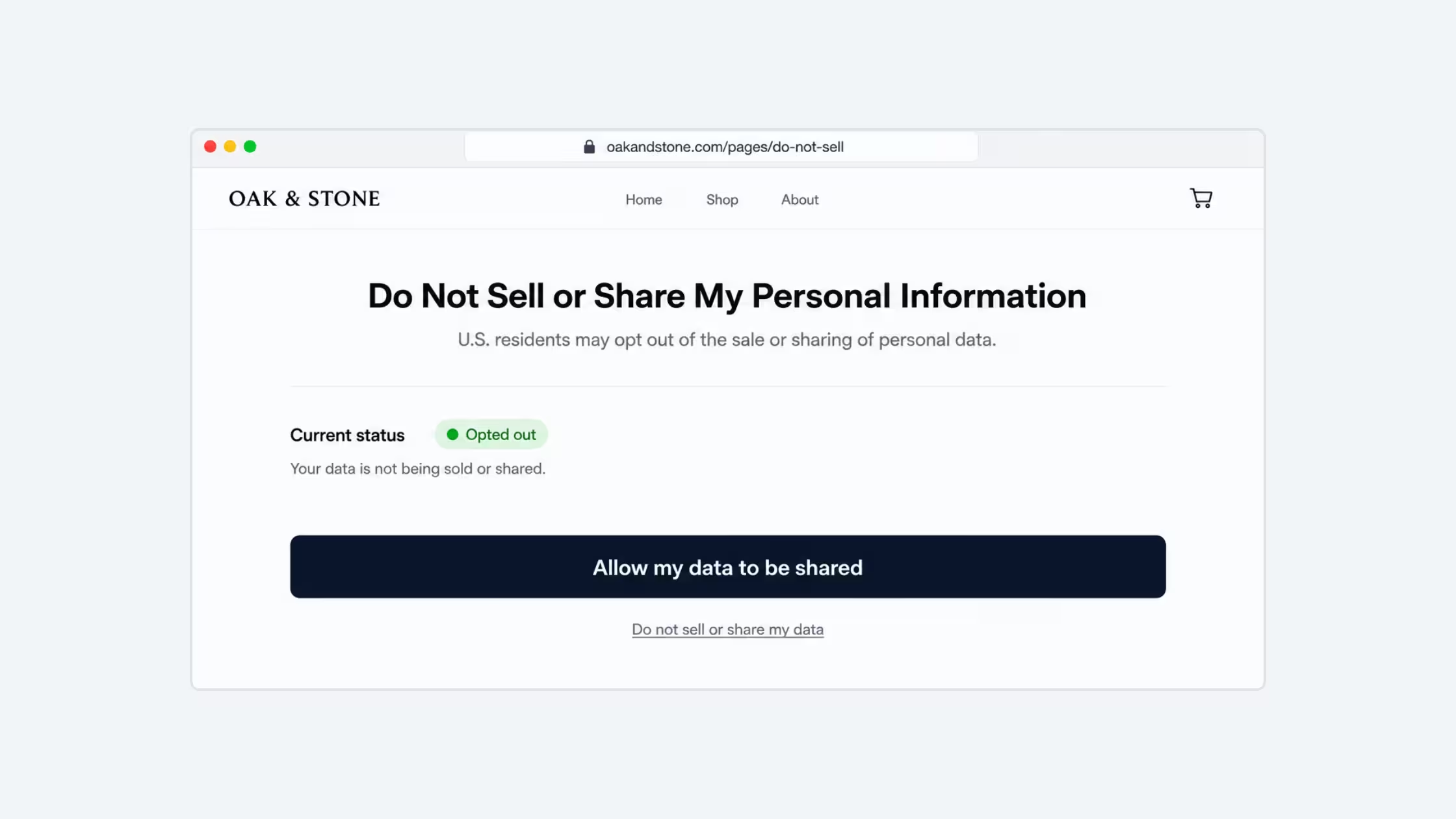
For customers whose opt-out preference comes from Global Privacy Control (GPC), the opt-out remains in place and the option to allow data sharing is not shown.
Takeaways
“Do Not Sell My Personal Information” requests are now a normal part of selling online in the U.S. They don’t mean customers are unhappy with your brand — they simply show that shoppers today are more privacy-aware and want control over their data.
With Consentmo and Shopify working together, most of the process is handled automatically. In the rare cases where you need to step in (like Shopify Audiences or third-party trackers), the steps are simple and clear.
By respecting these requests, you’re not just staying compliant - you’re building trust, transparency, and long-term loyalty with your customers.
Looking for more information on DSAR? Check out our full breakdown: DSAR Pages Explained: A Simple Guide for Shopify Merchants.



.avif)