If you’ve ever opened Google Ads or Google Analytics and thought:
“These numbers don’t look right.”
“Conversions dropped, but sales didn’t.”
“Something feels broken, but nothing is throwing an error.”
You’re not alone.
For many Shopify merchants, that confusion started around the same time cookie banners stopped being optional and Google introduced something called Consent Mode v2.
It sounds technical. It sounds legal.
But what it actually does is much simpler than most explanations make it seem.
Let’s walk through it in plain English.
TL;DR (Updated for 2026)
- Google Consent Mode v2 connects your cookie banner to Google tools.
- It tells Google what it is allowed to do based on a visitor’s consent choice.
- Without it, Google Ads and Analytics lose accuracy or stop working properly.
- Google now expects valid consent signals for stores serving users in GDPR regions.
If you want the full picture, keep reading.
The real problem Google Consent Mode v2 is trying to solve
Before privacy laws got serious, tracking was blunt.
Google tags loaded.
Cookies were set.
Data flowed.
Consent was rarely part of the conversation.
That changed with GDPR, ePrivacy, and similar laws. Websites had to ask users before tracking them, and users started saying “no”.
This created a gap.
Google still needed signals to power ads and reporting.
Merchants still needed numbers they could trust.
But tracking without consent was no longer allowed.
Google Consent Mode v2 exists to bridge that gap.
What Google Consent Mode v2 actually is
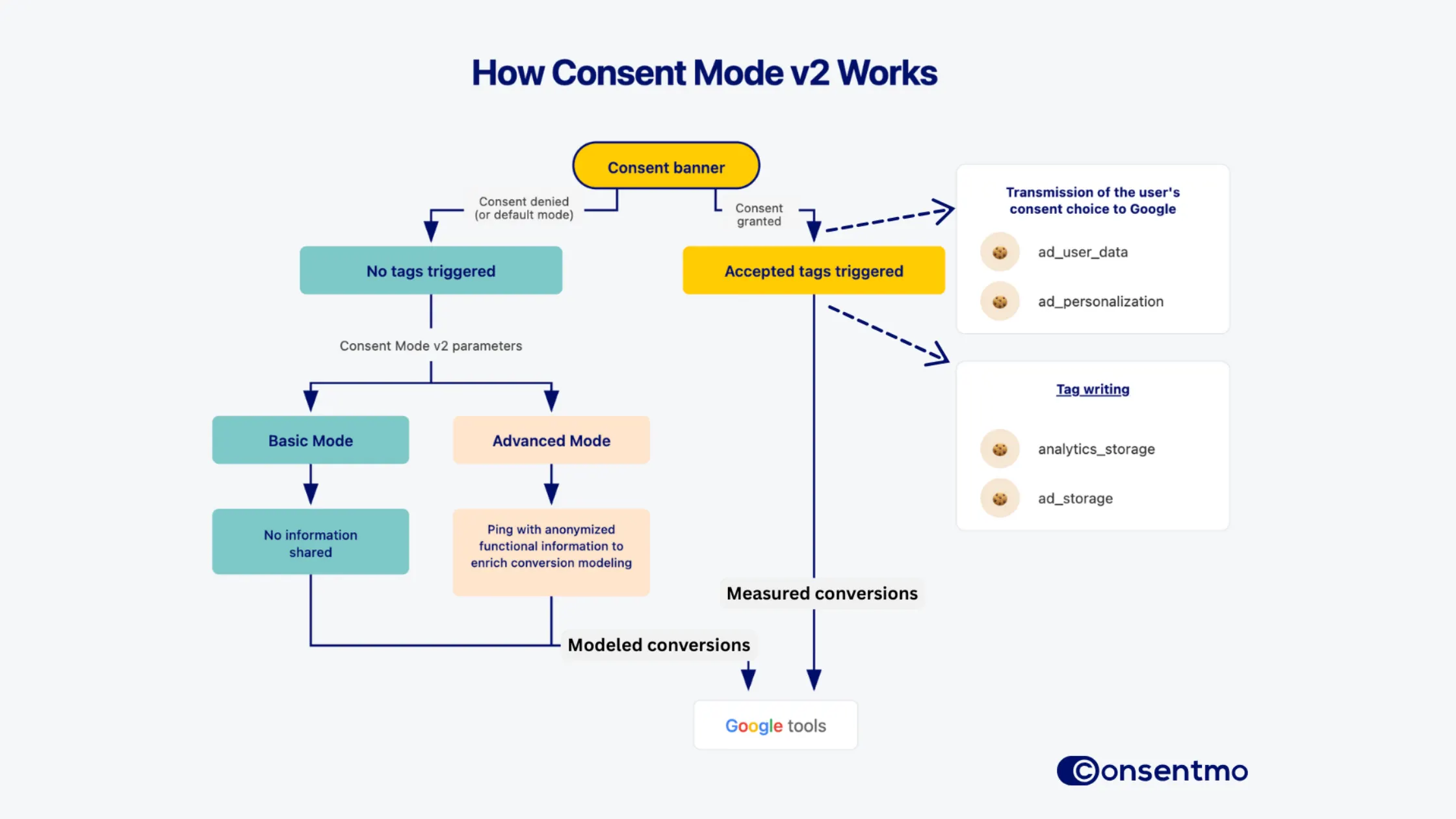
At its core, Consent Mode v2 is a messenger.
It does not collect consent.
It does not show a banner.
It does not decide anything on its own.
Its only job is to take the choice a visitor makes in your cookie banner and pass that choice to Google.
In simple terms, it answers one question:
“Is Google allowed to do this for this user?”
What happens when a visitor accepts cookies
When a user clicks “Accept” on your cookie banner, things behave the way most merchants expect.
Google Ads tracks conversions normally.
Google Analytics records full data.
Remarketing and attribution work as usual.
Nothing unusual here. This is how tracking worked before consent became mandatory.
What happens when a visitor rejects cookies
This is where Consent Mode v2 matters most.
When a user rejects cookies, tracking cookies must be blocked and no personal data can be stored. Google tags do not simply disappear. They change their behavior.
Depending on how Consent Mode is configured, Google may still receive anonymous, cookieless signals. These signals do not identify the user. They simply indicate that something happened on the site.
This is how modeled conversions exist at all.
Without Consent Mode, Google receives nothing.
Why Google cares so much about this now
This is no longer just a best practice.
Google introduced Consent Mode v2 to align with GDPR and ePrivacy requirements, enforce its EU User Consent Policy, and prevent advertisers from silently bypassing consent.
If your store serves users in the EU, UK, or similar regions and you use Google Ads or Google Analytics, Google expects to see valid consent signals.
Missing or broken signals do not always trigger an alert. They quietly degrade performance over time.
If you want to understand how serious that becomes, this is covered in
What happens if you don’t implement Google Consent Mode v2 at all?
How Google Consent Mode v2 relates to GDPR compliance
Consent Mode does not make a site GDPR compliant on its own.
GDPR requires valid consent before non-essential data is processed. Consent Mode simply ensures that Google tools respect that decision.
Used correctly, it helps align tracking behavior with legal requirements. Used incorrectly, or not at all, it creates blind spots and risk.
Think of Consent Mode as enforcement, not consent itself.
What Google Consent Mode v2 does not do
This part is important.
Consent Mode v2 does not replace your cookie banner.
It does not define what consent looks like.
It does not automatically make your site compliant.
It only reacts to the decision your banner captures.
That is why it must be paired with a proper consent management platform like Consentmo, which controls when scripts load and ensures the correct consent signal is sent to Google every time.
Without that connection, Consent Mode exists in name only.
Where most merchants get stuck
Once merchants understand what Consent Mode does, the next question comes fast:
“Should I use Basic or Advanced?”
That choice is not about setup difficulty. It is about performance versus legal risk.
Basic Consent Mode blocks all Google tracking until consent is given.
Advanced Consent Mode allows anonymous signals when consent is rejected.
Both are valid approaches. Both come with trade-offs.
.webp)
We break that decision down clearly in
Advanced vs Basic Consent Mode: performance gains vs GDPR risk
Why this matters even if users reject cookies anyway
A common assumption is:
“If people are rejecting cookies, tracking is gone either way, so why bother?”
Because there is a big difference between tracking being blocked correctly and tracking being missing entirely.
Consent Mode tells Google why data is missing. Without it, Google guesses. And guessing is bad for ads.
If you want to see how that plays out in real numbers, read How much data loss should you expect without Google Consent Mode?
Whichever mode you choose, setup matters more than the choice itself
Once you see it that way, the decision stops feeling like a trap and starts feeling like what it actually is: part of running a modern store.
At that point, the most important thing is not which option you choose, but how that choice is implemented.
Basic and Advanced Consent Mode only work if Google receives a clean, consistent consent signal. Many setups fail quietly. Tags fire too early. Scripts overlap. Consent states do not line up across Ads and Analytics.
From Google’s perspective, that does not look like a conscious choice. It looks broken.
That is why Consent Mode should be configured through a CMP like Consentmo, where merchants explicitly select Basic or Advanced mode and the app ensures consent is captured first, Google tags react correctly, and the right signal is sent for every visitor.
That consistency is what allows Google to trust the data it receives and merchants to trust their reports.
The takeaway
Google Consent Mode v2 is not about squeezing more data out of users.
It is about respecting consent choices while keeping measurement functional.
When it is set up correctly, it fades into the background, exactly where infrastructure should be.
If you are deciding whether to implement it, the real question is not if.
It is how, and how carefully.
Last updated: January 2026 to reflect Google Consent Mode v2 and current enforcement expectations.