Every day, shoppers hit pop-ups about cookies. For Shopify merchants, those small text files decide whether checkout works, whether analytics is reliable, and whether ads stay legal under GDPR, ePrivacy, CCPA, and other privacy rules.
This guide explains the four cookie categories you will see on most stores: strictly necessary, analytics (performance), marketing, and functional (preferences). You will also see how Consentmo maps those categories to a real banner, preference center, scans, and policy pages.
If you need a written policy visitors can read, start with What Is a Cookie Policy? and our product write-up on Smart Cookie Policy Page generation.
Strictly required (necessary) cookies
Think of strictly required cookies as the engine of your storefront. Without them, carts drop items, logins break, and checkout security steps fail. They support core jobs such as:
- Keeping a cart and session alive while someone shops
- Remembering login or checkout progress on your domain
- Security and fraud checks that protect payments
- Loading the consent choice itself so the banner can work
Why visitors usually cannot turn them off: these cookies power basic site functions. Under typical GDPR / ePrivacy practice, they can run without a marketing-style opt-in when they are truly needed for the service the shopper requested. Still, you should name them clearly in your cookie list and policy so people understand why they exist.
On Shopify, treat “necessary” carefully. Do not hide analytics or ads under this label. Consentmo’s scanner and category rules help you keep necessary tools separate from optional ones so your banner stays honest.
Analytics (performance) cookies
Analytics cookies act like coaches for the store. They show which pages load slowly, where people leave, and which products get attention. Common uses include session counts, funnel steps, and A/B tests on layout or copy.
Main role: measure patterns so you can fix friction and improve UX. Well-configured analytics focuses on aggregated behavior rather than treating every hit like a personal profile.
Consent note: in the EU/UK and many other regions, analytics is usually optional. Block or limit these tags until the shopper allows the analytics category. If you use Google tags, pair your CMP with Google Consent Mode so measurement respects the same choice. For context on what happens when Mode is missing, see how much data loss to expect without Consent Mode.
Marketing cookies
Marketing cookies power ads, retargeting, and many affiliate or influencer pixels. They remember products someone viewed and help platforms build audiences for paid campaigns.
Main role: personalize ads and measure campaign results. Some shoppers like relevant offers; others find cross-site tracking too aggressive. Privacy laws treat that reaction seriously: marketing storage and access almost always need a clear opt-in in the EU/UK, and U.S. state rules often require opt-out or “Do Not Sell/Share” style controls.
What merchants should do:
- List marketing cookies and pixels in plain language
- Load ad tags only after marketing consent (or after a valid opt-out signal where that is the legal model)
- Re-scan the store when you add new apps so new trackers do not slip in uncategorized
Influencer and UTM setups still touch cookies and scripts. For a merchant-focused angle, read How Cookie Consent Affects Influencer Tracking on Shopify.
Functional (preferences) cookies
Functional cookies remember choices that make the visit smoother: language, currency hints, saved UI preferences, or chat widget settings that are not strictly required for checkout.
Main role: convenience and personalization that is not pure advertising. Many regions still treat non-essential preference cookies as opt-in. If a “remember my setting” feature is optional, put it in the preferences/functional category and honor decline.
How the four categories work together on Shopify
A compliant store does three jobs at once:
- Detect cookies, pixels, and storage your theme and apps introduce
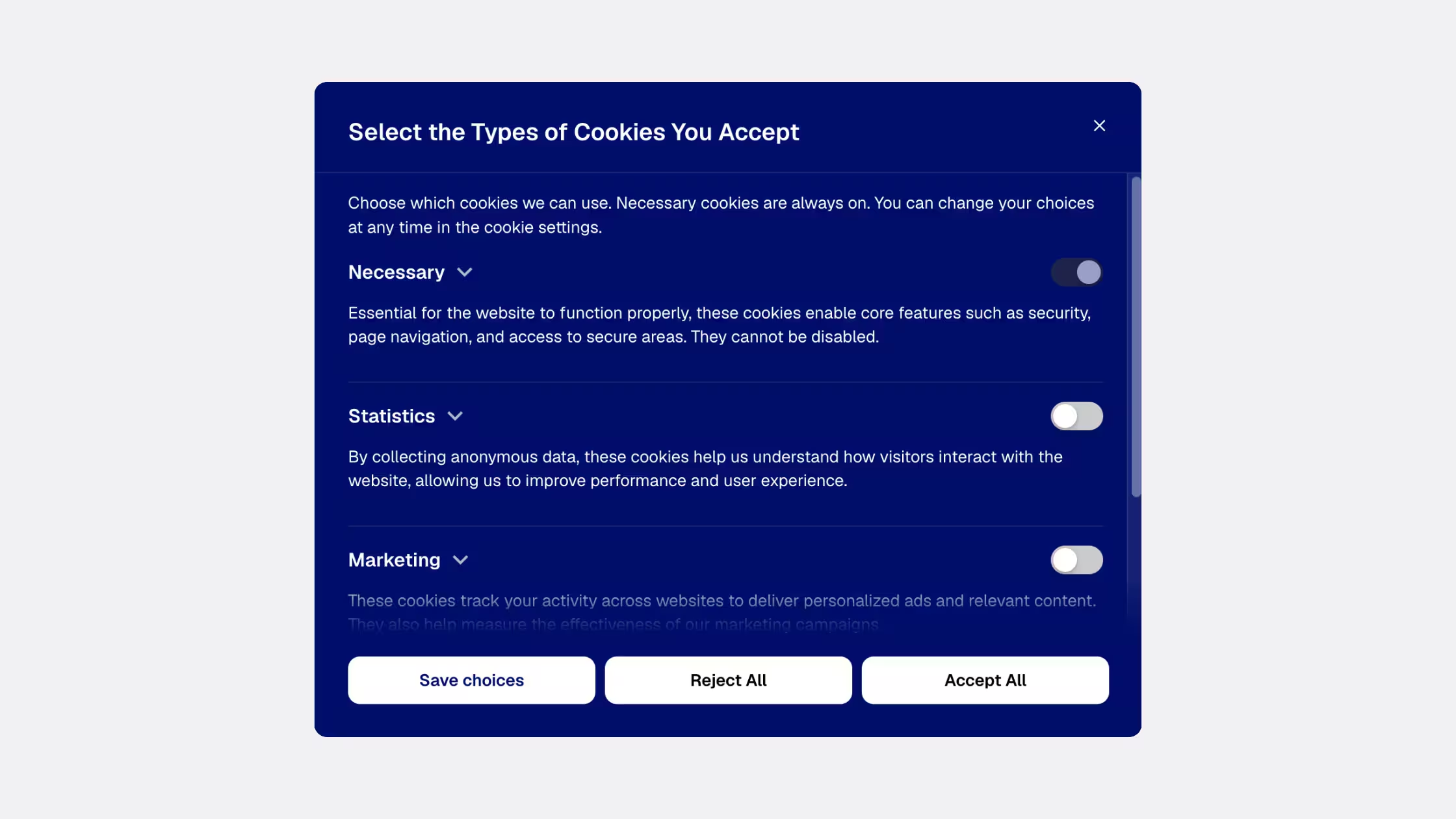
- Classify them into necessary, preferences, analytics, and marketing (or your CMP’s matching labels)
- Control scripts so optional tools wait for the right choice, then keep a record of consent
Banner design affects both trust and accept rates. Consentmo’s Smart Consent layout, faster cookie banner performance work, and cookie banner A/B testing are built for that balance. For region-specific rules, see cookie consent by U.S. state and our GDPR checklist-style updates for Shopify merchants.
Consentmo features that map to these cookie types
Consentmo is a Shopify consent and compliance app. These product areas connect directly to the categories above:
- Cookie banner and preference center – Show categories shoppers understand, with accept, reject, and granular controls where required
- Automatic cookie and script scanning – Find trackers after you install apps, then assign them to the right category
- Script / tracker control – Hold analytics and marketing tools until consent allows them
- Google Consent Mode support – Pass consent signals into Google tags the right way
- Smart geotargeting – Adjust banner behavior by region or U.S. state rules
- Smart Cookie Policy page – Keep a public cookie list closer to what the latest scan found
- Privacy Center and DSAR-style request flows – Give people a clear path for privacy requests beyond the banner
- Compliance Score – Spot gaps on the storefront; details in Check Your Shopify Store Compliance With Compliance Score
- Preview As – Check how the banner looks from another location before you go live
- Storefront JavaScript API – Let custom themes or Hydrogen storefronts read consent and open preferences from your own UI (Storefront JavaScript API overview)
- Multilingual banners and pages – Match the language of the markets you sell into
You do not need every feature on day one. Most merchants start with scan + banner + policy, then add geotargeting, Consent Mode, and Privacy Center as they grow.
Key takeaways
- Necessary cookies keep cart, login, and security working; label them honestly
- Analytics improve the store but usually need opt-in outside pure strictly necessary use
- Marketing cookies drive ads and retargeting; gate pixels behind marketing consent where the law requires it
- Functional cookies store convenience preferences; treat non-essential ones as optional
- Use a Shopify-native CMP to scan, categorize, block, document, and update as your app stack changes
Cookies are how modern storefronts run. Clear categories, a usable preference center, and tools like Consentmo turn that complexity into something shoppers and regulators can both understand.


.avif)