_converted.avif)
Most Merchants Don't Know If They're Actually Compliant
There's a common pattern among Shopify merchants who use cookie consent tools: they install the app, configure a banner, and assume the job is done. The banner is there. The settings look reasonable. It's probably fine.
That assumption is where compliance risk quietly builds up.
Cookie consent requirements vary significantly by jurisdiction. GDPR in Europe requires explicit consent, a visible reject option, and specific consent model logic. CCPA in California requires opt-out mechanisms. Several US states have their own requirements that differ from California's. If your consent setup doesn't match the exact rules for each region your banner is active in, you have a compliance gap — and without a clear way to measure that, you may not know until it becomes a problem.
We built Compliance Review to give you a clear, measurable answer to the question most merchants can't answer today: how compliant is your store, and exactly what needs to change?
Key Takeaways
- Compliance Review is available now from Cookie Banner > Compliance inside Consentmo.
- Real-time compliance score: your setup is measured against 13 checks and returns a clear numerical score out of 100.
- Current vs. potential score: see where you stand today and exactly how high your score can reach if you complete the recommended fixes.
- Prioritized recommendations: issues are grouped by High, Medium, and Low impact so you always know where to focus first.
- Country-specific insights: every issue is tied to the exact region and country it affects, not a generic warning.
- Direct action buttons: each recommendation includes a single action button that takes you directly to the relevant setting.
- Passing checks included: see what's already working alongside what needs fixing, for a complete picture of your setup.
Your Compliance Score, at a Glance
The moment you open Compliance Review, you get two numbers that tell the full story.
Your current score is calculated by running your live cookie consent setup against multiple compliance checks across all your active regions. It's displayed as a score out of 100 alongside a risk level (High, Medium, or Low) so the implications are immediately clear. A score of 63 with a Medium risk label is a measurably different situation from a score of 90 with a Low risk label, and the dashboard makes that distinction obvious.
Your potential score shows what your score becomes if you complete all the recommended fixes. In most cases this reaches 100/100, which gives you a concrete target and a clear sense of how much improvement is within reach. Alongside it, a green badge shows exactly how many points are available to gain — "+37 points available" is a much more motivating number than a vague suggestion to "improve your setup."
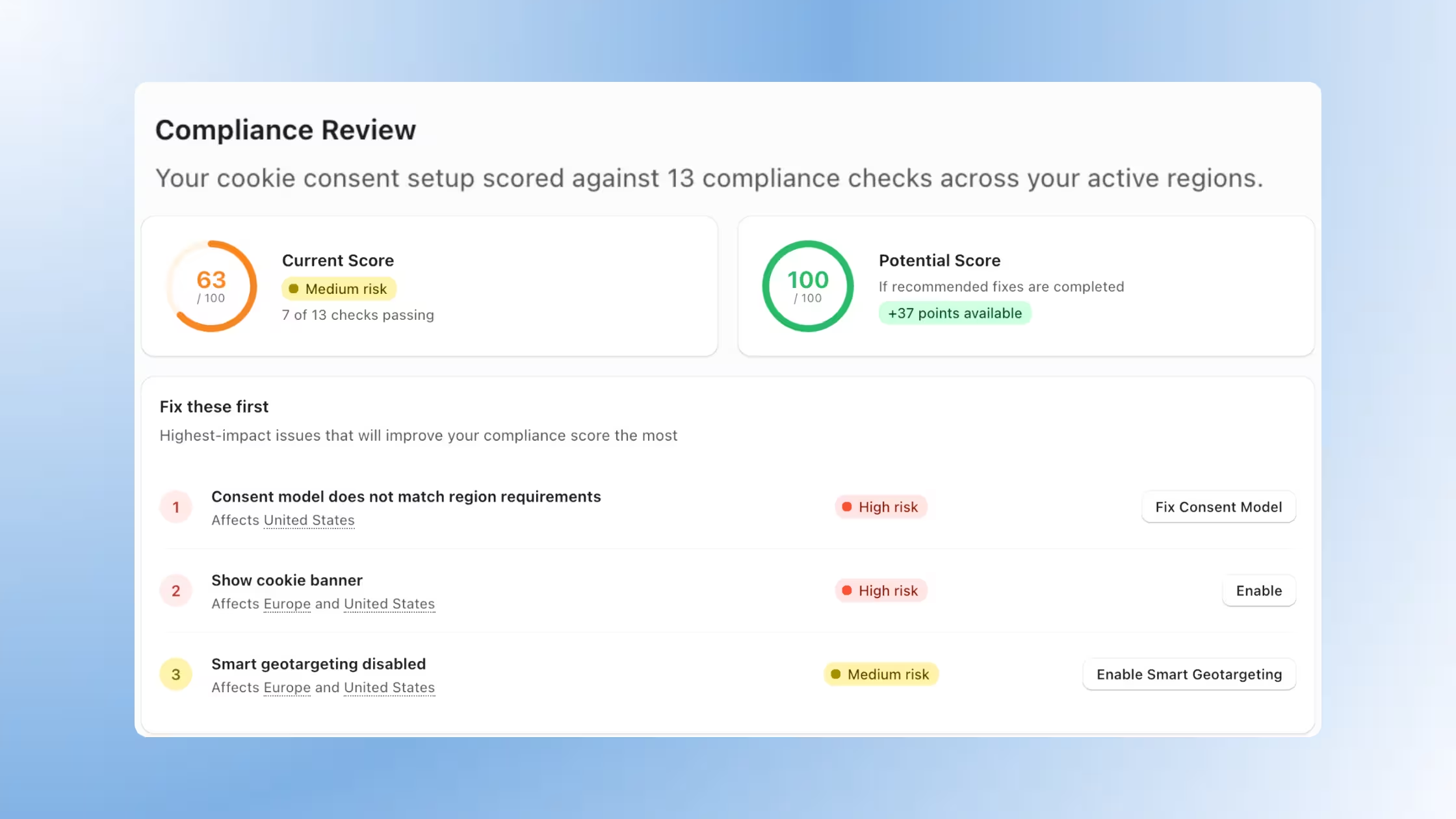
Below the score cards, a region-level summary row shows your score broken down by active region — Europe, United States, and any others you have configured — each with its own score, risk level, and issue count. This tells you at a glance whether your compliance gap is concentrated in one region or spread across several.
Install Consentmo and see your Shopify store compliance score now.
Prioritized Fixes, Not a List of Problems
Most compliance tools tell you something is wrong. Compliance Review tells you what to do about it, in what order, and exactly where to go.
The "Fix these first" section sits at the center of the experience. It's a ranked list of recommendations, ordered by impact. The fixes at the top of the list carry the most weight for your score and your legal exposure. Every item in the list includes:
- A priority number so you always know what to tackle next
- A clear issue description explaining the specific gap
- The regions and countries affected so you understand the geographic scope
- A risk badge (High, Medium, or Low) for immediate severity context
- A direct action button - one click takes you to the exact setting you need to change
That last point matters more than it might seem. A common frustration with compliance tooling is finding an issue identified but no clear path to resolving it, leaving you to navigate through settings menus on your own. Compliance Review removes that step entirely. "Fix Consent Model," "Enable Smart Geotargeting," "Configure GCM v2" - each button drops you directly into the right place.
Every Issue Is Tied to a Specific Country
Compliance requirements don't apply uniformly across regions. A configuration that is perfectly correct for the United States may be non-compliant in Germany, and vice versa. Compliance Review accounts for this at a granular level.
When you expand a region in the compliance breakdown, you see a full list of the countries within that region and the number of issues identified in each. Austria, Belgium, France, Germany - each country is shown individually with its own issue count, reflecting the specific legal context that applies there.
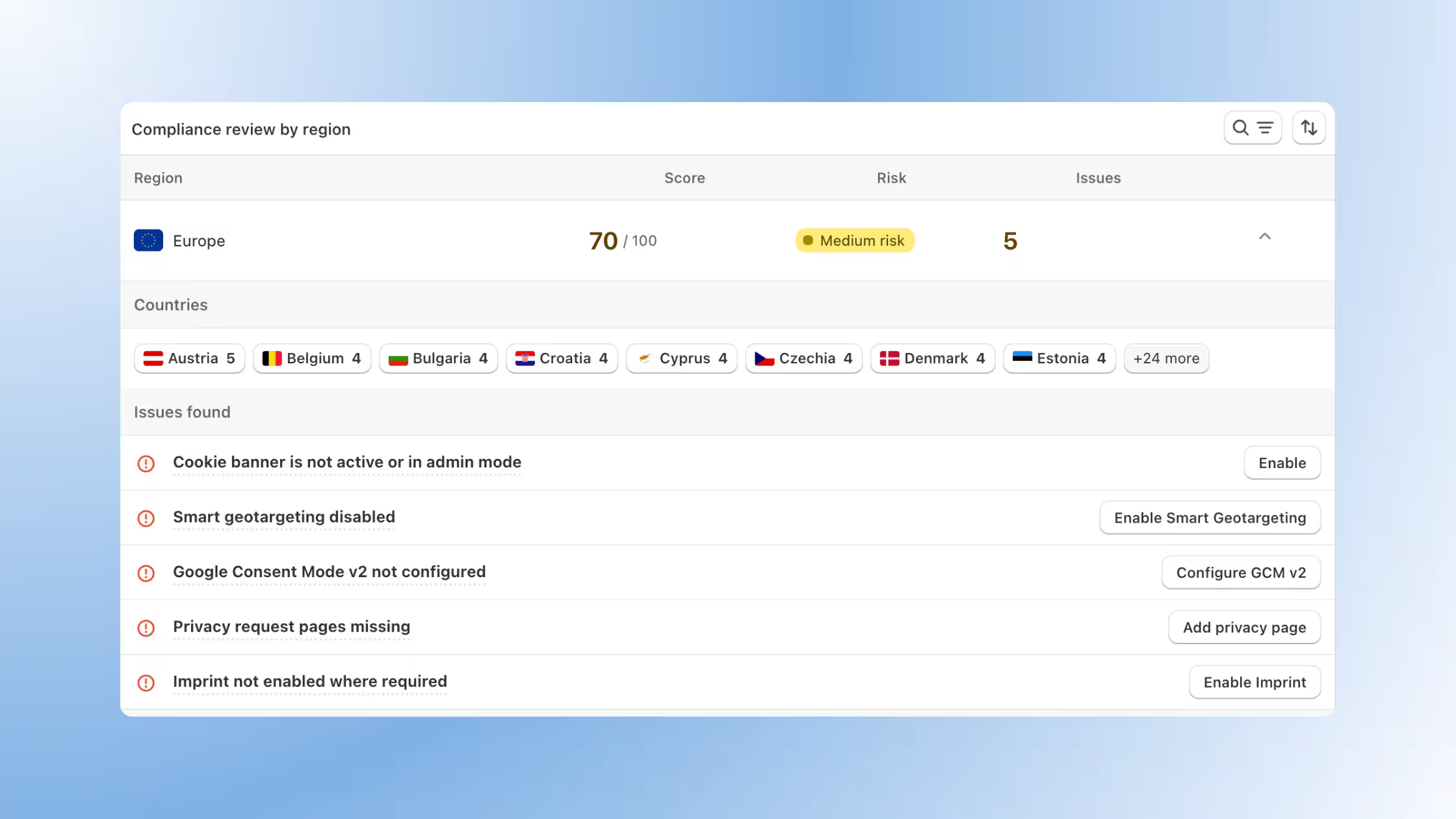
This means you're not responding to generic warnings. You're responding to specific gaps in specific places, which is both more accurate and more defensible if your compliance posture is ever questioned.
Check your regional set up for possible risks with Consentmo.
Your Current Compliance Passed Checks
Compliance Review also shows your passing checks — the compliance criteria your current setup already satisfies.
This is worth including because it gives you a complete picture rather than a one-sided audit. Seeing that your cookie state before consent is compliant, your explicit consent mechanism is configured correctly, and your multilingual banner is active tells you where your setup is solid and where to focus your attention for improvement.
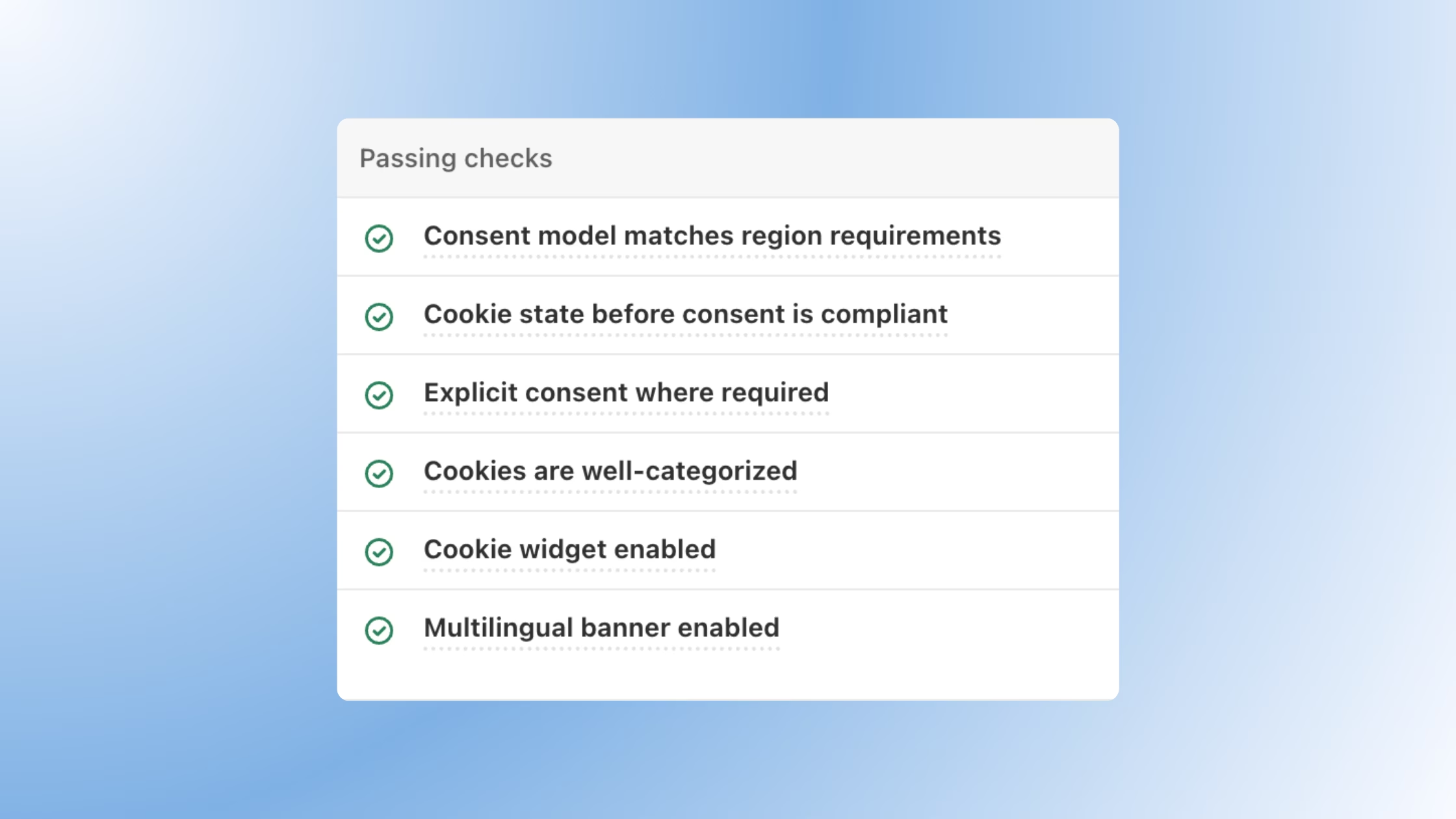
As you work through the prioritized recommendations and complete fixes, passing checks accumulate and your score updates to reflect the progress. The dashboard is designed to be revisited, not just reviewed once.
Filter by Region, Risk, or Issue Status
As your active regions grow, so does the compliance data inside the dashboard. Compliance Review includes a dedicated filtering system so you can slice that data quickly without scrolling through everything at once.
Three controls are available:
- Search: Type any region or country name to jump directly to it
- Issues filter: Toggle between regions with open issues and those that are fully passing, so you can focus only on what needs attention (or confirm what's clean)
- Risk filter: Narrow the view to High, Medium, or Low risk regions specifically, useful when you want to triage only your most critical gaps first
Filters stack, so you can combine them. Selecting "Issues: Open" alongside "Risk: High" instantly surfaces only the regions that have unresolved high-severity problems, cutting through everything else. Active filter tags sit above the results table so you can see exactly what you're looking at and dismiss any filter in one click.
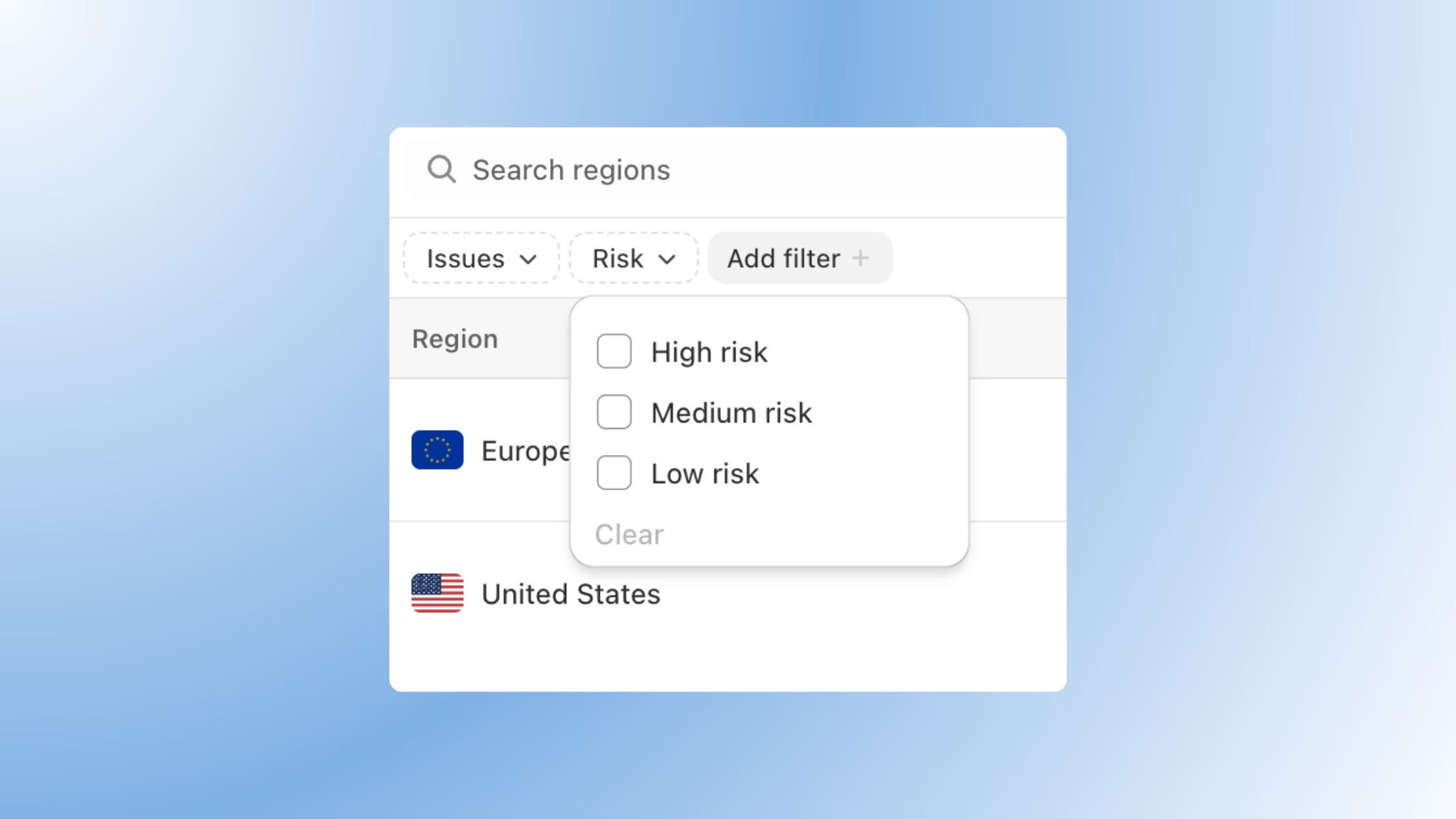
For merchants running banners across multiple jurisdictions, this turns a potentially overwhelming dashboard into a focused, prioritized workflow. Get started today.
How to Access Compliance Review
Compliance Review is available now on all plans. Here's how to get started:
- Open your Consentmo admin.
- Go to Cookie Banner > Compliance.
- Review your current score and risk level.
- Work through the "Fix these first" list, starting from priority 1.
- Use the action buttons to resolve each issue directly.
- Return anytime to track your progress as your score improves.
The more of your active regions you have configured in Consentmo, the more useful Compliance Review becomes as it checks every region you're running against the rules that apply specifically there.
Ready to find out where you actually stand? Open Compliance Review in Consentmo →