


Managing customer data requests is one of the most misunderstood parts of running a GDPR- and CCPA-compliant Shopify store. Consentmo handles the heavy lifting automatically, but merchants are often unsure how the Compliance Pages, Request Emails, and Request Pages are connected — and what each one actually does.
This guide walks through the full flow so you can understand exactly what your customers experience when they submit a data request, and what happens on your end.
What Are the Consentmo Compliance Pages?
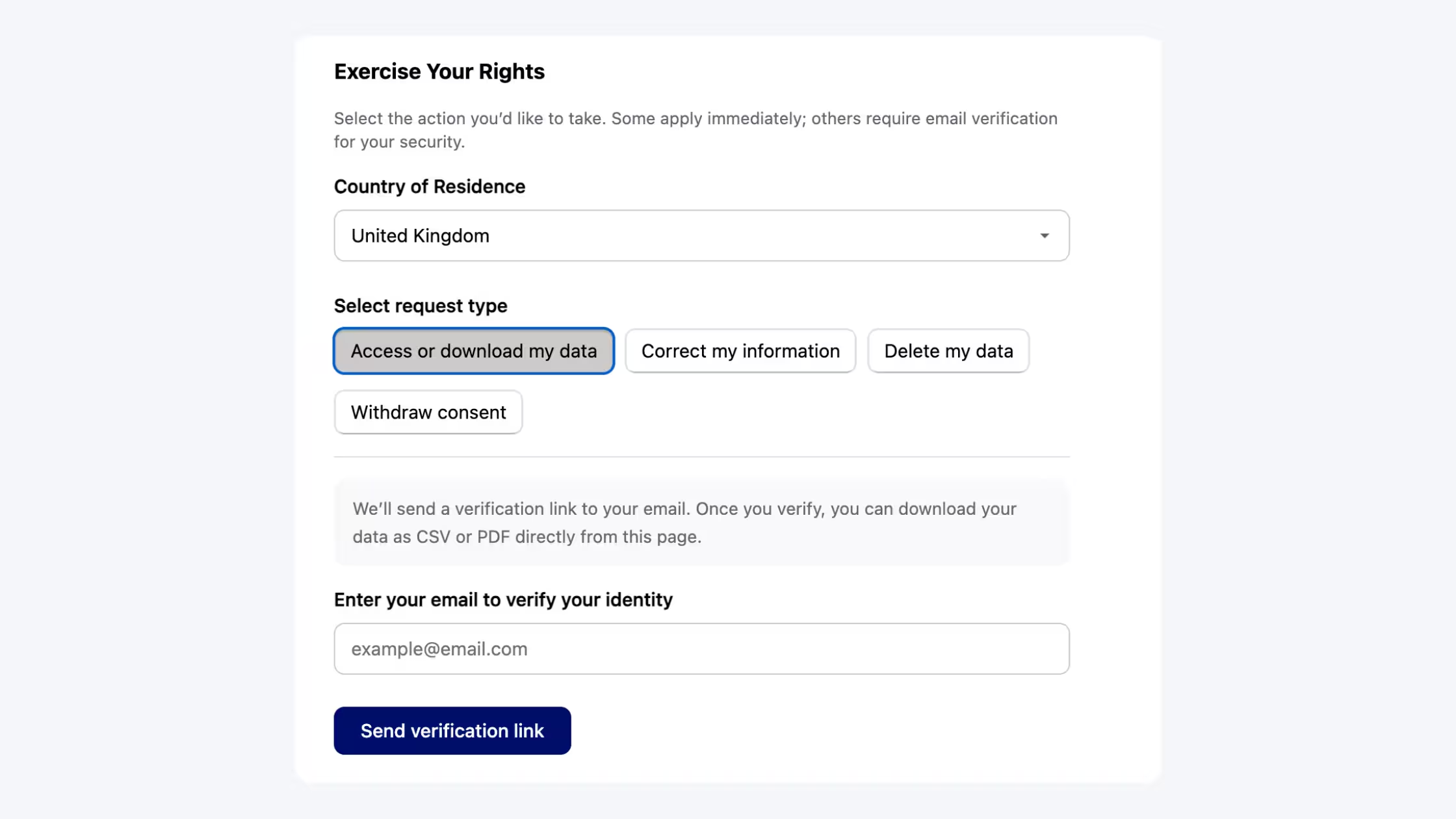
Compliance pages are automatically generated when you install Consentmo. Presented under the heading Exercise Your Rights, they give your customers a straightforward way to submit data requests in line with the privacy regulations that apply to their region.
The available request types adapt based on the customer's country and state. Here is what each region sees:
GDPR (EU customers, e.g., Germany)
- Access or download my data
- Correct my information
- Delete my data
- Withdraw consent
CCPA (US customers, e.g., California)
- Access or download my data
- Correct my information
- Delete my data
- Do not sell or share my personal information
- Limit the use of my sensitive personal information
_converted.avif)
All information processed through these pages is pulled directly from Shopify. Consentmo does not store any personal data, with one exception: the customer's email address is stored only when they actively submit a request. For full details, see the Consentmo Privacy Policy & Terms of Service.
New in Consentmo: The Smart Privacy Center consolidates all compliance request types (GDPR, CCPA, PIPEDA, and more) into a single, unified /your-privacy-choices URL that automatically adapts to your customer's region. If you're setting up Consentmo for the first time or reviewing your current setup, the Smart Privacy Center is the recommended approach. Learn more here.What Are Request Emails and Request Pages?
Once a customer submits any request, two things happen automatically:
- They receive a Request Email confirming the request and containing a secure action button.
- Clicking that button takes them to a Request Page where they can complete or confirm the action.
Think of the Compliance page as the front door, the Request Email as the confirmation, and the Request Page as where the actual action takes place.
Here is a walkthrough of each request type.
Request Type 1: Access or Download My Data
How to submit:
- Select Access or download my data
- Enter your email address and click
- Send verification link
What happens next: The customer receives a verification email. After confirming, they land on a Request Page where they can download their data as a CSV or PDF.
Request Type 2: Correct My Information
How to submit:
- Select Correct my information
- Enter your email address and click
- Send verification link
What happens next: The customer receives a verification email with a secure link to a Request Page where they can update their account details.
Request Type 3: Delete My Data
How to submit:
- Select Delete my data
- Enter your email address and click
- Send verification link
What happens next: The customer receives a verification email. After clicking through to the Request Page, they can confirm the deletion. Once confirmed:
- You (the store admin) receive a notification email about the deletion request
- The request is logged in the Customer data requests tab inside Privacy Center for your reference
Important: Consentmo does not automatically delete customer data from your store. After a deletion request is confirmed, you need to:
- Go to the Customers section of your Shopify admin
- Find the relevant customer
- Submit a request to erase their personal data directly through Shopify
Note that Shopify may take a few days to fully remove all data associated with that customer
Request Type 4: Withdraw Consent
How to submit:
- Select Withdraw consent
- Enter your email address and click
- Send verification link
What happens next:The customer receives a verification email. The linked Request Page allows them to withdraw any previously given consent for data processing.
Request Type 5: Do Not Sell or Share My Personal Information
Available for US customers (CCPA)
How to submit:
- Select Do not sell or share my personal information
- Enter your email address and click
- Send verification link
What happens next: The customer receives a verification email confirming their opt-out from the sale or sharing of their personal information.
Request Type 6: Limit the Use of My Sensitive Personal Information
Available for US customers (CCPA)
How to submit:
- Select Limit the use of my sensitive personal information
- Enter your email address and click
- Send verification link
What happens next:
The customer receives a verification email. The linked Request Page lets them restrict how their sensitive personal data is used by the store.
Next Steps
If you have questions about your compliance setup, the Consentmo support team is available via live chat, and the Help Center covers most configuration scenarios in detail.
For merchants looking to consolidate their privacy request pages into a single, region-aware experience, check out the Smart Privacy Center — the modern replacement for managing all data request types in one place.



.png)