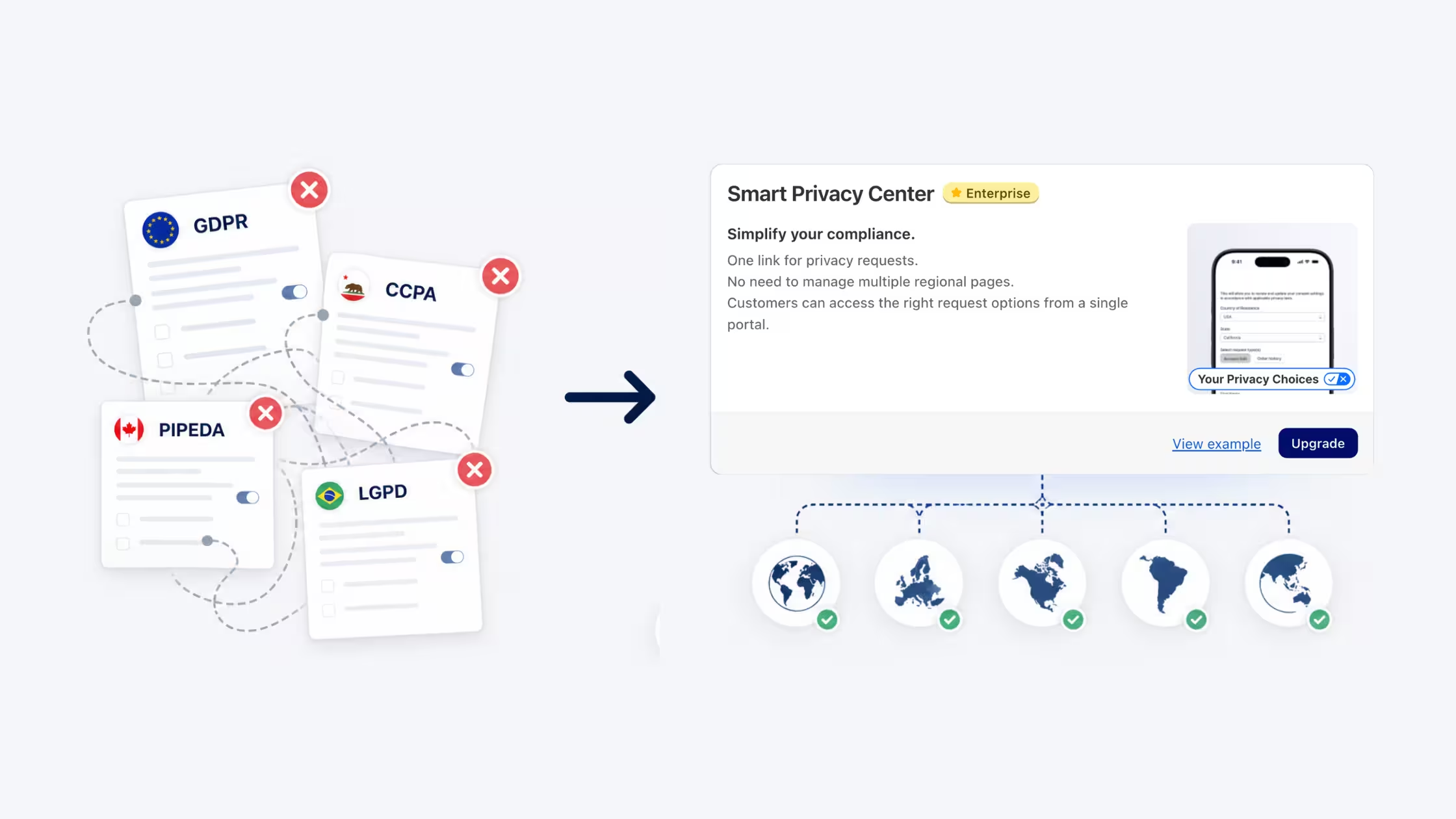
If you've operated a Shopify store in more than one region, you've likely run into this: one page for GDPR requests, a separate one for CCPA, another for PIPEDA, and another for whatever comes next. Each page needs its own URL, its own footer link, its own legal copy, and its own maintenance cycle.
Every time a new privacy law passes or you expand into a new market, the checklist grows. Miss one update and you're out of compliance. Add a new cookie banner region and you're back to auditing which pages still need to be updated.
This isn't a compliance strategy. It's a maintenance burden that compounds over time.
We built the Smart Privacy Center to replace this model entirely - one page, one URL, automatic coverage everywhere.
Key Takeaways
- Smart Privacy Center is an exclusive Enterprise feature inside Consentmo — enable it from your app admin under Privacy Request Pages.
- Single URL: one link (
/your-privacy-choices) handles every privacy request across all regions, replacing the old "one page per law" setup. - Automatic regional coverage: the page shows the correct forms, fields, and legal messaging based on each visitor's location, covering GDPR, CCPA/CPRA, PIPEDA, and more.
- Full design control: customize colors, styles, verification emails, and confirmation messages to match your brand.
- "Set it and forget it" scaling: as you expand into new countries, the Smart Privacy Center covers them automatically. No new pages required.
- Reduced maintenance: one update fixes everything globally instead of auditing and editing across multiple disconnected pages.
The Old Way: One Page Per Law
The regional privacy page model made sense when GDPR was the only law most merchants needed to think about. You built one page, added a footer link, and moved on.
That world no longer exists.
Today, a Shopify store selling internationally may need to handle requests under GDPR (EU), UK GDPR, CCPA/CPRA (California), PIPEDA (Canada), and an expanding list of US state laws. Each law has its own required forms, fields, and legal language. Each page needs its own URL in your footer. Each one needs to stay current as laws evolve.
The result is a fragmented compliance setup where a single policy change can require updates in five different places and where a missed update in one region creates real legal exposure.
One Page. Every Region. Automatically.
The Smart Privacy Center replaces all of that with a single, unified Your Privacy Choices page.
When a customer clicks your footer link and lands on /pages/your-privacy-choices, the page automatically detects their location and renders the correct forms, required fields, and compliant legal messaging for their specific region, all from one URL.
There's nothing to configure per region. There's nothing to rebuild when a new law passes. There's one page to maintain, one URL to add to your footer, and one place where every DSAR request flows through.
A. Single Page Efficiency
One URL handles everything. Instead of /pages/gdpr-request, /pages/ccpa-request, and /pages/pipeda-request each living in different parts of your store, a single /pages/your-privacy-choices link covers every visitor regardless of where they're browsing from.
Centralized control. Your branding, legal copy, verification email, and confirmation message all live in one editor. Update them once and the changes apply globally, no more hunting through separate pages to keep everything consistent.
B. Automatic Global Coverage
No manual mapping required. The Smart Privacy Center automatically determines which forms, fields, and legal disclosures to show based on each visitor's location. There's no setup required per region and no decision tree to maintain.
Built-in regional support. GDPR, UK GDPR, CCPA/CPRA, PIPEDA, and additional supported laws are covered out of the box. When Consentmo adds support for a new regulation, your page picks it up automatically.
C. Full Control Over Design
The Smart Privacy Center is a fully customizable flow that reflects your brand.
From the Manage Page editor, you can configure:
- Privacy page: set page background, text colors, button colors, and link text. Edit the full page content using a built-in rich text editor. Toggle the footer link on or off and customize the URL slug.
- Verification email: customize the subject line, body text, button label, footer message, and brand colors so every email looks like it came from your store.
- Thank you / confirmation page: write your own heading and message for the final step of the request flow, with automatic translation support if you leave the fields empty.
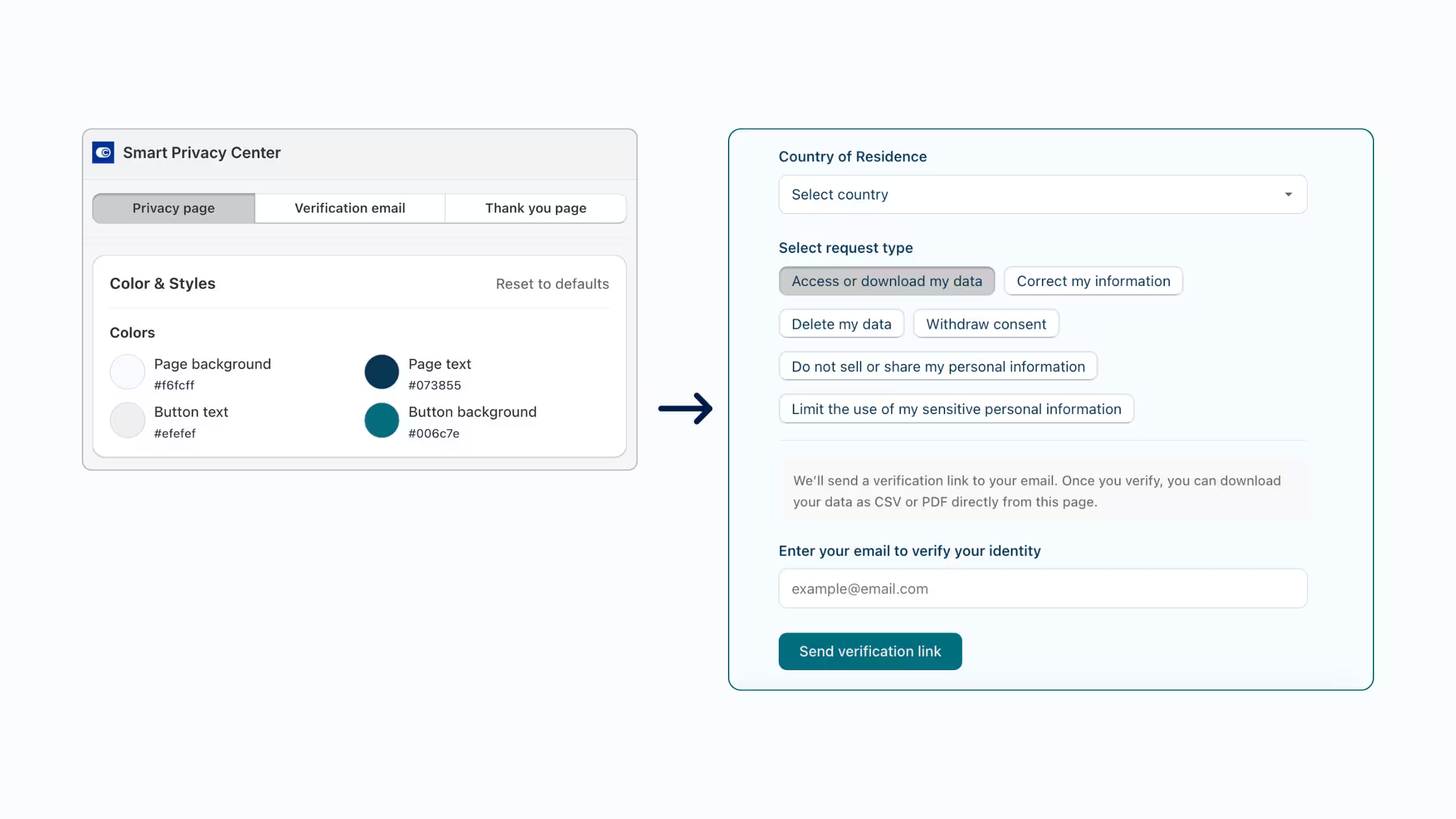
Each element previews instantly in both desktop and mobile views, so you can see exactly how the experience looks before publishing.
D. Built for Growing Stores
Set it and forget it. Once the Smart Privacy Center is enabled and published, it scales with your business automatically. Expand into a new country, and your existing page already covers it. No new pages, no new footer links, no new compliance tasks.
Fewer maintenance alerts. When a new privacy law passes or you enable a new cookie banner region, one global update handles everything. You're not auditing five separate pages, you're updating one.
How to Enable Smart Privacy Center
Smart Privacy Center is available now for Enterprise plan users. Here's how to get started:
- Open your Consentmo admin.
- Go to Sidebar > Privacy Center > Privacy Request Pages.
- Select Smart Privacy Center and click Enable Smart Privacy Center.
- Click Manage page to open the editor.
- Customize your Privacy page, Verification email, and Thank you page using the three tabs at the top.
- Click Publish when you're ready to go live.
- Add the
/pages/your-privacy-choicesURL to your store footer - you're done.
The page is live immediately after publishing. No Shopify theme changes required beyond adding the footer link.
If you're on a Free, Standard, or Plus plan, upgrading to Enterprise unlocks the Smart Privacy Center alongside the full suite of advanced consent and accessibility features.
Why a Unified Privacy Page Builds More Trust
Beyond the operational benefits, a single, professionally designed privacy center communicates something important to your customers: that your store takes privacy seriously.
A fragmented setup with multiple pages, inconsistent designs, and varying legal copy creates uncertainty. A cohesive Your Privacy Choices experience — from the footer link through to the final confirmation page - signals that privacy requests are handled with care and professionalism.
Customers who trust how you handle their data are more likely to convert, return, and stay.
Ready to simplify your compliance setup? Enable Smart Privacy Center in Consentmo →