compliance

Terms & Conditions Checkbox for Shopify

Require customers to accept your store's terms before purchasing. Add a customizable checkbox to product pages and carts, with acceptance records to help you keep track of customer agreements.
Set Up Terms & Conditions With Consentmo
Trusted by over 90,000 Shopify merchants
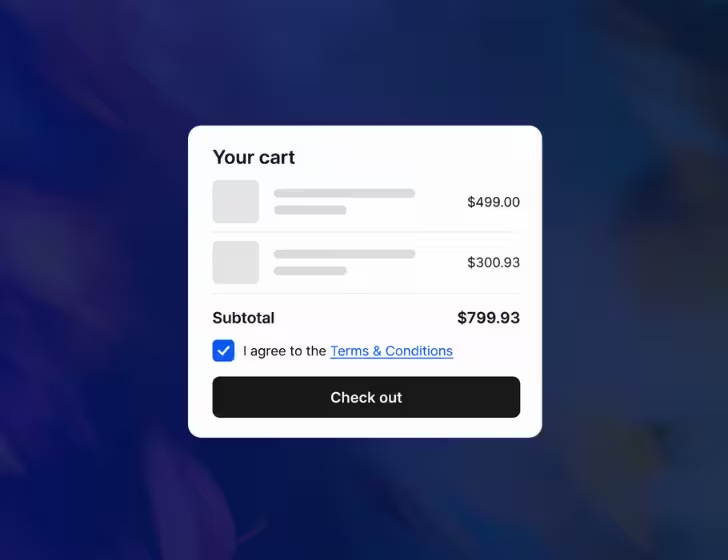
Consentmo Terms & Conditions checkbox on a Shopify cart page, allowing customers to agree to store policies before checkout.

When Does Your Shopify Store Need a Terms & Conditions Checkbox?

Having a Terms & Conditions page doesn't mean customers will review it before purchasing. A required checkbox brings important purchase conditions into the buying process and records when customers agree.
  • Returns & refunds: Ask customers to acknowledge important return or final-sale conditions.
  • Digital products: Present licensing, delivery, and applicable withdrawal conditions before purchase.
  • Pre-orders & made-to-order items: Make production times and expected shipping windows clear.
  • Subscriptions & recurring purchases: Highlight payment, renewal, and cancellation conditions.
Important purchase terms deserve clear acknowledgement
A checkbox helps communicate store policies and document customer agreement. It does not replace any additional disclosures or consent steps required by applicable law.
guide

What Should a Terms & Conditions Checkbox Give Your Store?

Required Agreement
Ask customers to accept your terms before proceeding through supported purchase actions.
Flexible Storefront Placement
Display the checkbox on product pages, the cart page, or supported cart drawers.
Easy Access to Your Terms
Link directly to your policy or let customers review it in a popup without leaving the purchase page.
Clear Error Message
Control what visitors see when they do not meet your requirement.
Recorded Customer Acceptance
Keep a record of when customers accepted your terms, with details available in Consentmo reports.
Ask for mandatory terms agreement on checkout
Start With Consentmo
compliance app

Set Up Terms & Conditions With Consentmo

Choose which terms customers agree to, where the checkbox appears, and how acceptance is recorded. Manage everything directly from Consentmo.
How Consentmo helps you manage customer agreements:
Choose Your Terms & Conditions Source Link
Connect your existing Shopify Terms of Service or provide a custom URL for the policy customers need to accept.
Choose How Customers View the Terms
Open the agreement in a popup or direct customers to the policy page. Keep important conditions easy to access before purchase.
Select Where the Checkbox Appears
Add the checkbox before Add to cart on product pages, above the checkout button on the cart page, or inside supported cart drawers.
Customize the Design
Adjust checkbox, text, link, and error colors. Use custom CSS for additional styling that matches your Shopify theme.
Edit Messages & Translations
Customize the agreement message and validation alert. Use the languages configured in your Shopify store to provide localized text.
Record, Preview & Save
Enable acceptance recording, preview the checkbox and error message on desktop and mobile, and save your configuration.
5 stars
5/5
1,900+ Reviews
steps

Make Customer Agreements Part of the Purchase Process
Give customers a clear way to acknowledge your terms, while keeping the checkbox easy to manage alongside your other Consentmo features.
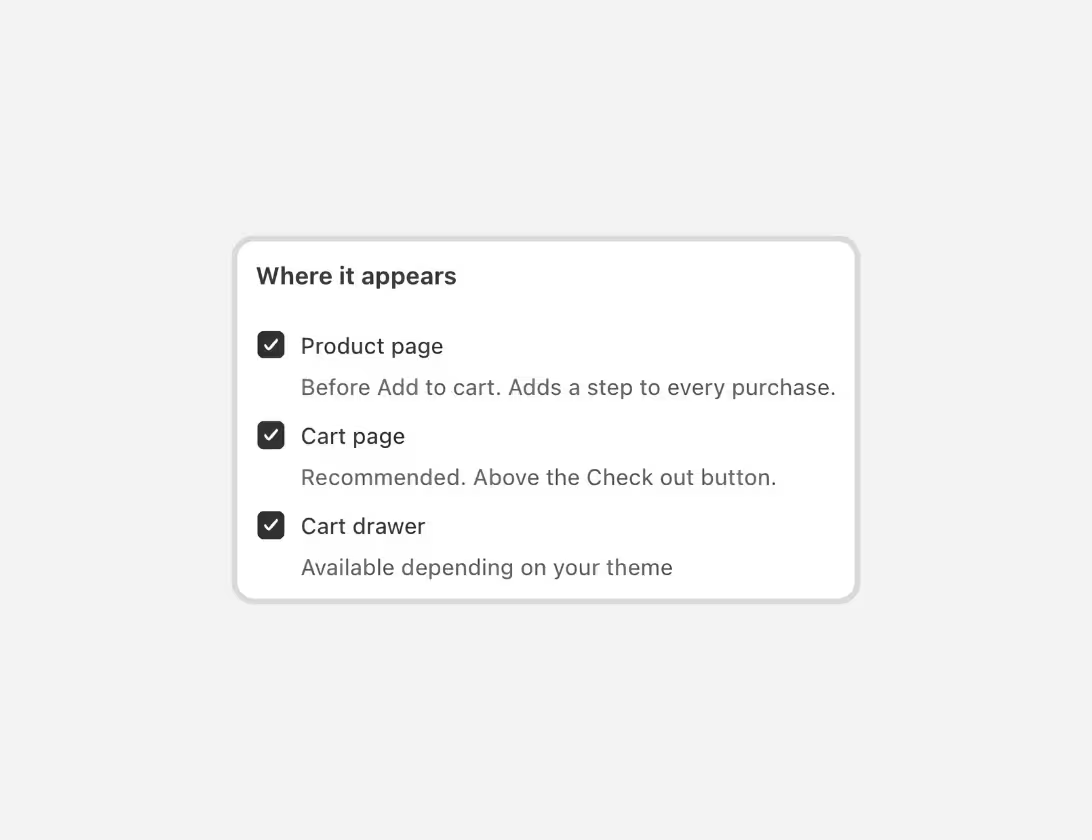
Consentmo Terms & Conditions checkbox placement settings for Shopify product pages, cart pages, and cart drawers.
Show the Checkbox Where Customers Buy
Add a required acknowledgement to your Shopify product page, cart page, or cart drawer. Choose the placements that work with your storefront.
Consentmo Terms & Conditions checkbox design settings for Shopify, allowing customization of checkbox, link, text, and error message colors.
Checkbox Consistent With Your Store
Customize the checkbox text, policy link, colors, validation message, and translations. Preview the experience on desktop and mobile so it fits naturally into your existing storefront.
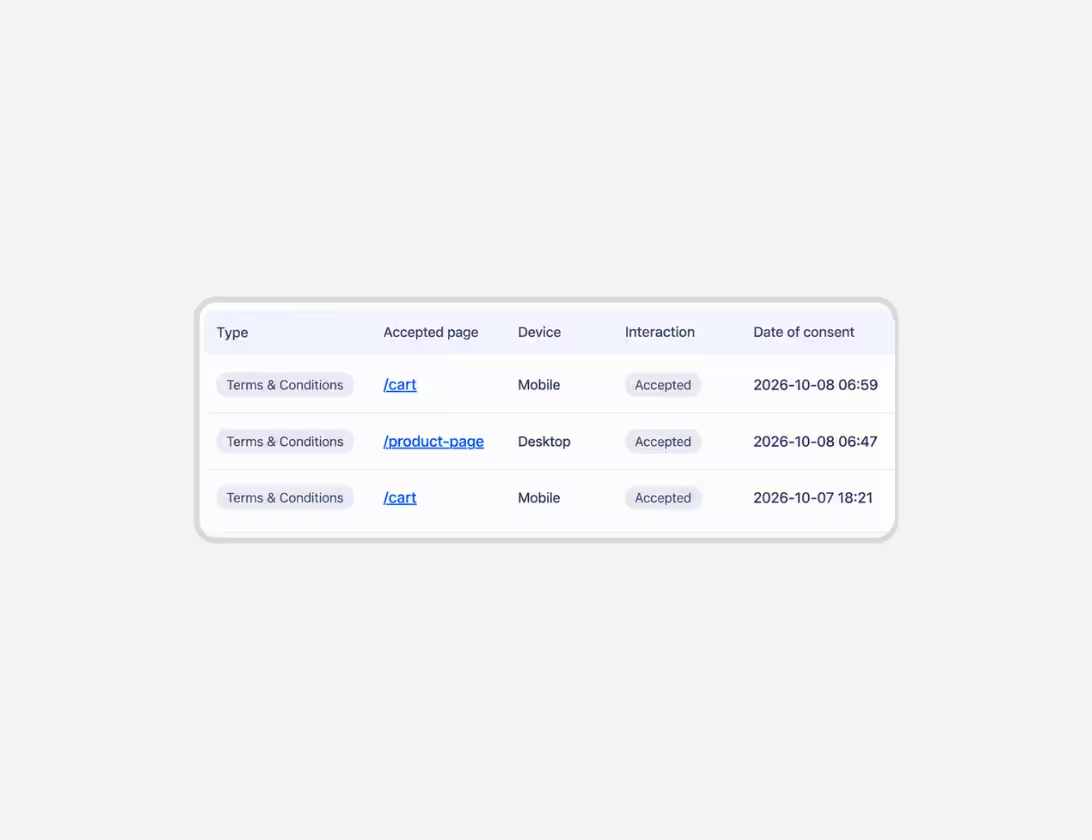
Consentmo Terms & Conditions acceptance records showing accepted pages, device types, interactions, and consent timestamps for Shopify stores.
Keep Proof of Customer Acceptance
Enable acceptance recording to keep a history of customer acknowledgements. Review timestamps, accepted pages, interactions, locations, and device types.
90,000+ Brands already use Consentmo
Black Panasonic logo.
Black Häfele logo on a transparent background.
Black Steve Madden logo.
Black text logo reading 'florence by mills' on a transparent background.
Invisalign logo consisting of a stylized eight-petal flower symbol followed by the word 'invisalign'.
L'Occitane black brand logo.
Black and white Linkin Park band logo with stylized angular letters.
Toys R Us logo with a star inside the letter R.
Edward Sexton black and white logo with stylized text and vertical line on the left
Vera Wang logo.
Black Panasonic logo.
Black Häfele logo on a transparent background.
Black Steve Madden logo.
Black text logo reading 'florence by mills' on a transparent background.
Invisalign logo consisting of a stylized eight-petal flower symbol followed by the word 'invisalign'.
L'Occitane black brand logo.
Black and white Linkin Park band logo with stylized angular letters.
Toys R Us logo with a star inside the letter R.
Edward Sexton black and white logo with stylized text and vertical line on the left
Vera Wang logo.
Testimonials

Trusted by Shopify merchants, globally.

Don’t just take our word for it. See what Shopify store owners are saying.
Anne’s Candle Boutique
Helpful!
I needed assistance with the widget showing up! Support was most helpful!
Moss & Willow
Easy to install.
Easy to install and very helpful with checking the compliance.
DC Gold Logo featuring a shiny gold bar with a black vinyl record in the center.
DC GOLD AUDIO
Works great.
Works great. They double check the configuration to make sure its good for california and europe and the rest of the world.
Noclu
Easy solution.
Setup was easy and help was very professional. Support did a great job helping us get set up and made the process very easy.
Holland Kertészet
Necessary app!
If you're doing business within the EU, this is the app you need to be in accordance with the GPDR laws. It's also in accordance with Google Consent V2. Swift, fast and knowledgeable support. Definitely one of the necessary apps on Shopify to have for your store.
Proporta
Served us very well for years.
The app has served us very well for years. Support responds very quickly and helped us with the Google GCM V2 implementation.
MoverX
Great app!
Great app. Support was great, very knowledgable and quick at assisting us and making sure we were compliant with Google Consent Mode V2.
Arcadia
Easy solution.
Finally an easy to install solution to handle GCMV2 that works on Shopify, the support was really great!
Kensla Studio
Switched from Cookiebot
Exceptional help from the support team! I previously used Cookiebot by Usercentrics before switching to Consentmo, and the difference is remarkable. The integration is much easier, and the support is outstanding. Highly recommended!
Base Camp Food
Working correctly after a theme update.
Support team is a legend and was able to confirm the cookie banner and consent mode v2 was setup and working correctly after a theme update.
Aldous
Works flawlessly!
Works flawlessly, good custom CSS to personalize it, integrates with Google Consent Mode V2 and awesome Customer Support Team.
Dahomy.nl
Great support!
Great support! Quick response, clear instructions, and helpful documentation. Resolved my Google Consent Mode V2 issue in no time. Highly recommend!
Kensla Studio
Switched from Cookiebot
I previously used Cookiebot by Usercentrics before switching to Consentmo, and the difference is remarkable. The integration is much easier, and the support is outstanding. Highly recommended!
Base Camp Food
Working correctly after a theme update.
Support team is a legend and was able to confirm the cookie banner and consent mode v2 was setup and working correctly after a theme update.
Stille
Seamless setup!
Very seamless setup! I have experienced other apps where there are some needs for manual changes and there are no developers to help, so it was really nice to experience this great support here.
Dahomy.nl
Great support!
Great support! Quick response, clear instructions, and helpful documentation.
FAQ

All You Need to Know

Age Gate FAQ – Consentmo
What is a Terms & Conditions checkbox on Shopify?

A Terms & Conditions checkbox asks customers to confirm they agree to your store's policies before proceeding with a purchase. Consentmo lets Shopify merchants add a required checkbox to supported purchase actions and optionally record customer acceptance.

How do I add a Terms & Conditions checkbox to Shopify?

Install Consentmo, navigate to Age gate & Terms → Terms & Conditions, and enable the feature. Choose your policy, configure where the checkbox appears, customize its design and messages, and save the settings. The feature uses the Consentmo Terms Shopify app embed.

Where can I display the checkbox?

You can display it on Shopify product pages, the cart page, and supported cart drawers. You can enable more than one placement, depending on your storefront setup.

Can I use my existing Shopify Terms of Service?

Yes. Consentmo can link directly to your Shopify Terms of Service or to a custom policy URL. Customers can open the policy page or review the terms in a popup.

Can Consentmo record when customers accept the terms?

Yes. Enable Record every acceptance to save acknowledgement records. These are available under Analytics & Reports → Reports → Consent records and include information such as the acceptance date, page, location, and device type.

Can I customize the checkbox for different languages?

Yes. Consentmo retrieves the languages configured in your Shopify store. You can customize the checkbox message and validation text for each available language.

Which Consentmo plans include the Terms & Conditions feature?

The Terms & Conditions Checkbox is available on Consentmo's Plus and Enterprise plans.

Have more questions?
Contact our team
Contact Us