TLDR
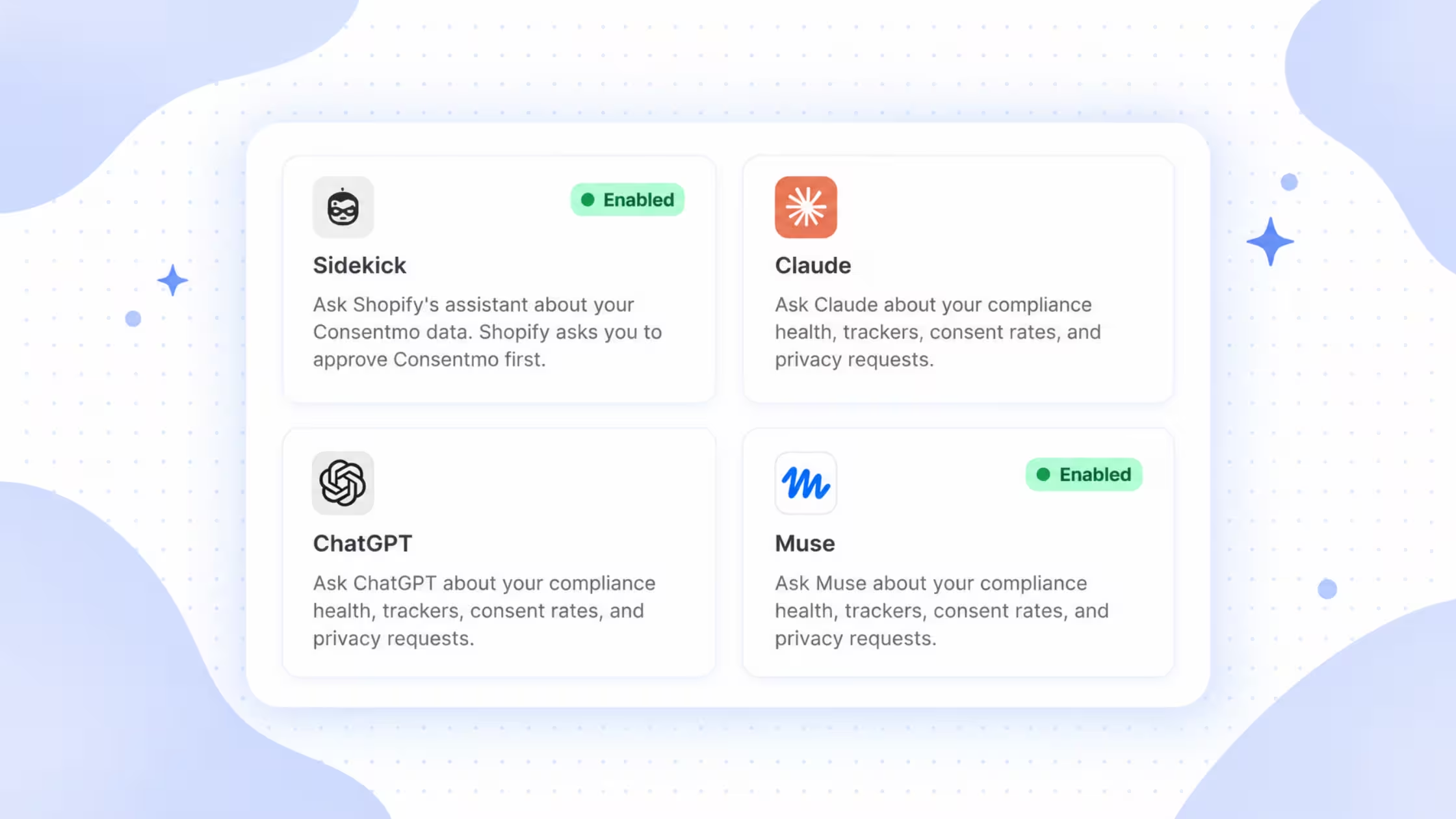
- Consentmo now ships MCP (Model Context Protocol) connections for ChatGPT, Claude, and Muse.
- You connect once from Integrations, approve a short-lived key, and ask plain-language questions about your store’s privacy setup.
- Answers use your Consentmo data.
- Access is read-only: the assistant cannot change settings or see customer emails.
- This extends the same idea as Consentmo inside Shopify Sidekick to the AI apps your team already opens every day.
Changelog: Connect Consentmo to Claude and ChatGPT App: Consentmo on the Shopify App Store
What this integration is
MCP is an open standard that lets AI apps talk to external systems in a consistent way. Consentmo exposes a connector at https://app.consentmo.com/mcp. Once you approve the link, supported assistants can query compliance-related context from your account.
In practice you stay in ChatGPT, Claude, or Muse and ask things like:
- How is my store doing on privacy?
- How many of my trackers are still uncategorized?
- Which countries see my cookie banner?
- What should I fix first?
You get Sidekick-style privacy answers without bouncing back into the Consentmo admin for every check.
Scope you should set expectations on
The product UI states this clearly: Read only. The assistant can’t change your settings or see customer emails.
Why merchants use it
- Answers where you already work – Ops, support, and founders already live in ChatGPT or Claude. Privacy status joins those chats instead of living only in a separate app tab.
- Faster triage – Uncategorized trackers, banner coverage by country, and “what first” prioritization become conversational checks during a standup or BFCM war room.
- Same data model as Sidekick – If your team already uses Consentmo through Shopify Sidekick, external assistants mirror that read-only insight pattern outside admin.
- Controlled connection – One-time keys, short expiry, explicit approve step, and a clear Disable path if you need to cut access.
Setup: ChatGPT
Open Consentmo → Integrations → ChatGPT.
Connect in 3 steps
- In ChatGPT, open Settings, then Plugins, then turn on Developer mode.
- Select the + button, choose Create app, then Create MCP app. Name it Consentmo and paste this link in the Connection field:
https://app.consentmo.com/mcp - Finish creating the connection. On the Consentmo page that opens, paste the key you create with Create key, then approve.
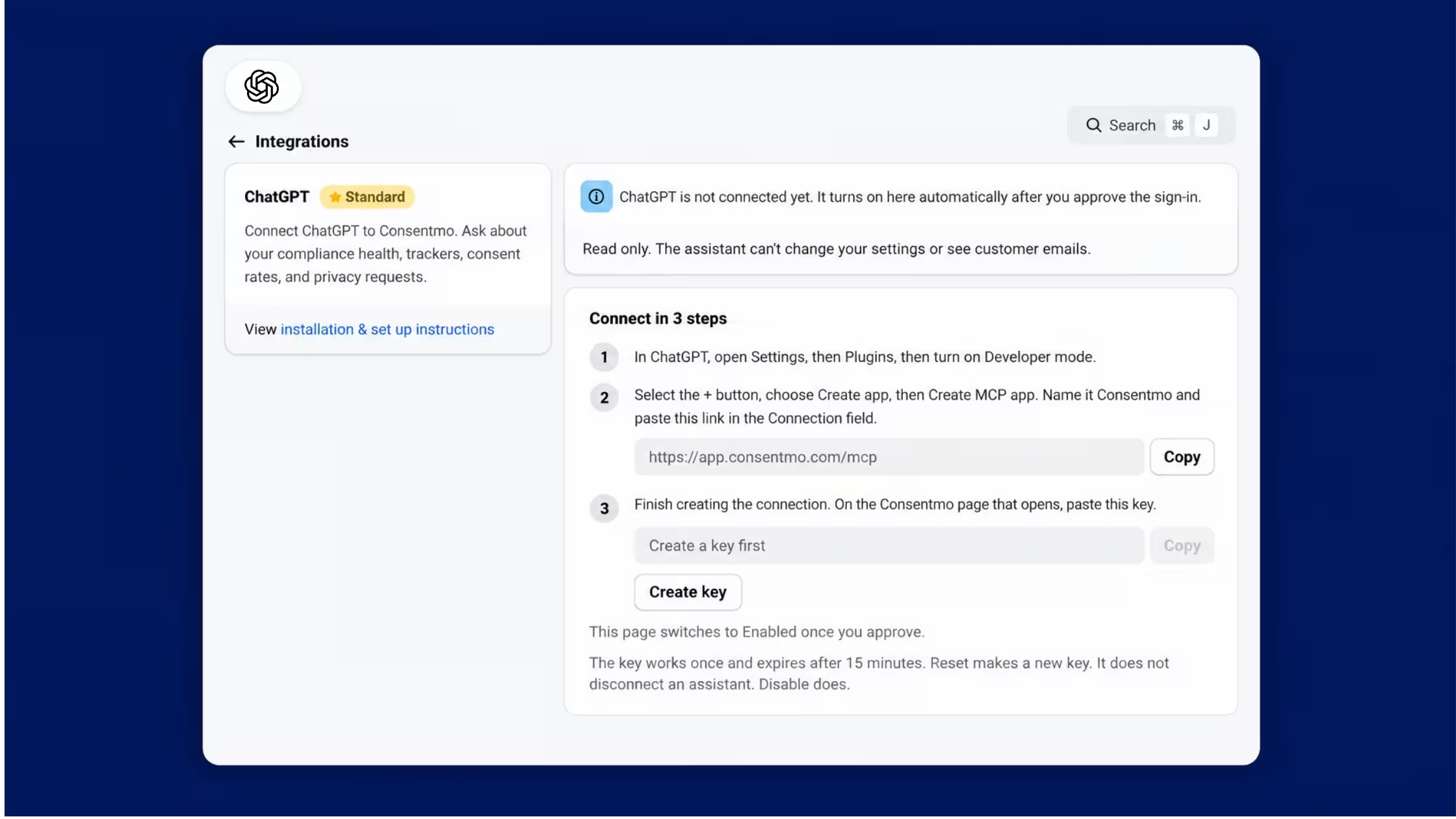
When approval succeeds, the ChatGPT integration page shows Enabled.
Try asking
- How is my store doing on privacy?
- How many of my trackers are still uncategorized?
- Which countries see my cookie banner?
- What should I fix first?
Setup: Claude
Open Consentmo → Integrations → Claude.
Connect in 3 steps
- In Claude, open Customize, then Connectors, then Add, then Add custom connector.
- Name it Consentmo and paste
https://app.consentmo.com/mcp. Keep the default options and click Add. - Click Connect in Claude. On the Consentmo page that opens, paste the key from Create key and approve.
_converted.avif)
Try asking the same privacy questions listed above via Ask Claude or your connected Claude chat.
Setup: Muse
Open Consentmo → Integrations → Muse.
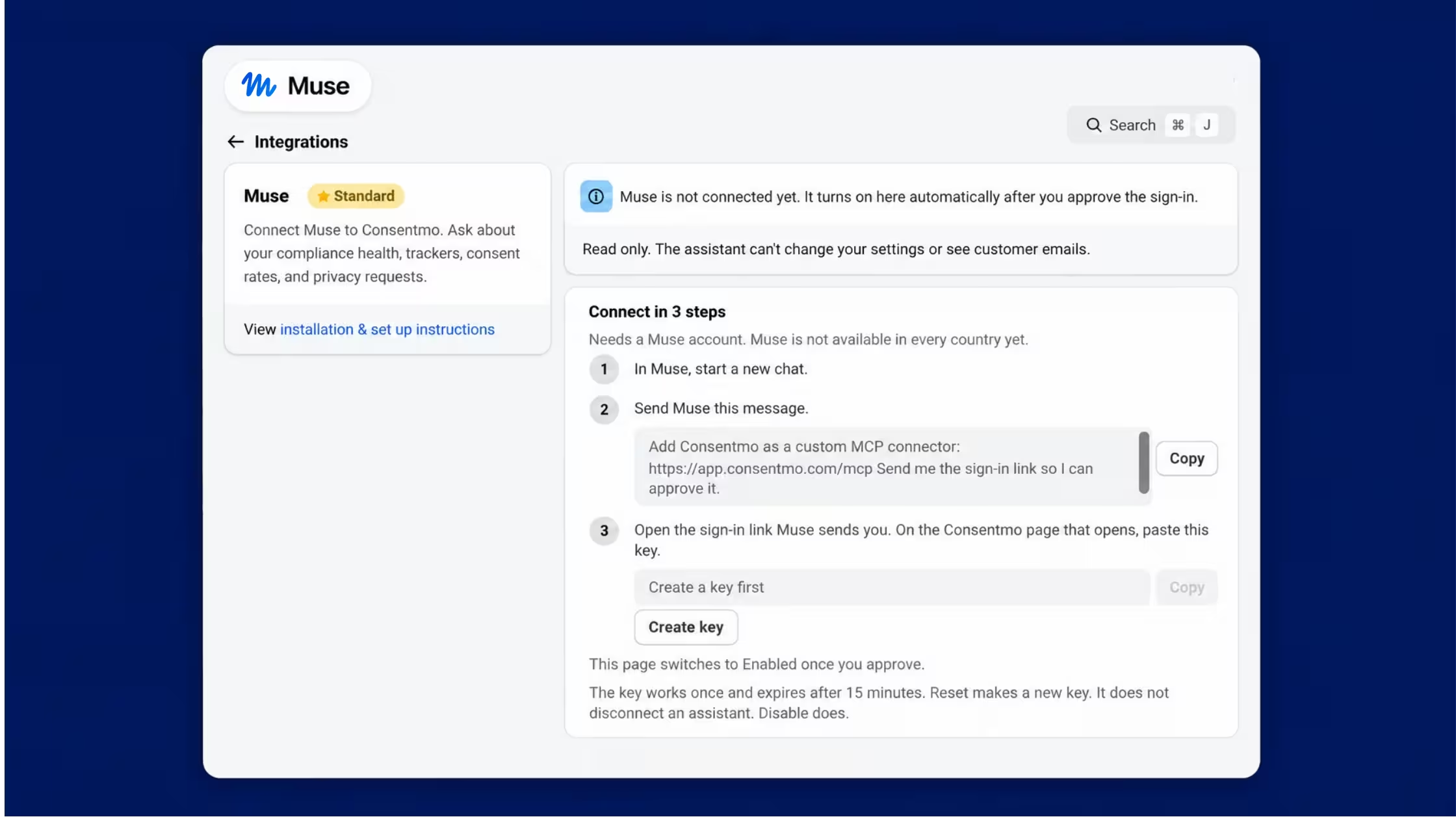
Muse needs a Muse account and is not available in every country yet. Confirm availability for your team before you promise it in SOPs.
Connect in 3 steps (plus the in-app “How to connect” detail)
- Open Muse (muse.ai or the Muse app) and start a new chat.
- Send Muse this message (copy from the Consentmo page):
Add Consentmo as a custom MCP connector: https://app.consentmo.com/mcp Send me the sign-in link so I can approve it.
- Muse adds Consentmo as a custom connector and replies with a sign-in link.
- Create a key on the Consentmo Muse page first. Open the sign-in link Muse sent. On the Consentmo page that opens, paste the key and approve. Note: Muse does not ask for the key in its own window. You paste the key only on Consentmo.
- Return to Consentmo. Muse shows Enabled once the connection is approved.
Try asking the same sample questions; the Muse page exposes Copy actions for each prompt so you can paste them into Muse quickly.
Side-by-side: which assistant to connect
You can enable more than one assistant. Disable any connector you no longer need from its Integrations page.
What to ask first (practical checklist)
Use these as a weekly or pre-campaign pass:
- Health: “How is my store doing on privacy?”
- Trackers: “How many of my trackers are still uncategorized?” Then open Tracker Manager for anything still open.
- Banner reach: “Which countries see my cookie banner?” Compare to your real traffic markets.
- Priorities: “What should I fix first?” Treat the answer as a triage list, then confirm in Consentmo before you change production settings.
- Requests: Ask about open privacy requests or backlog if your connector surfaces case context, then resolve cases in Privacy Center.
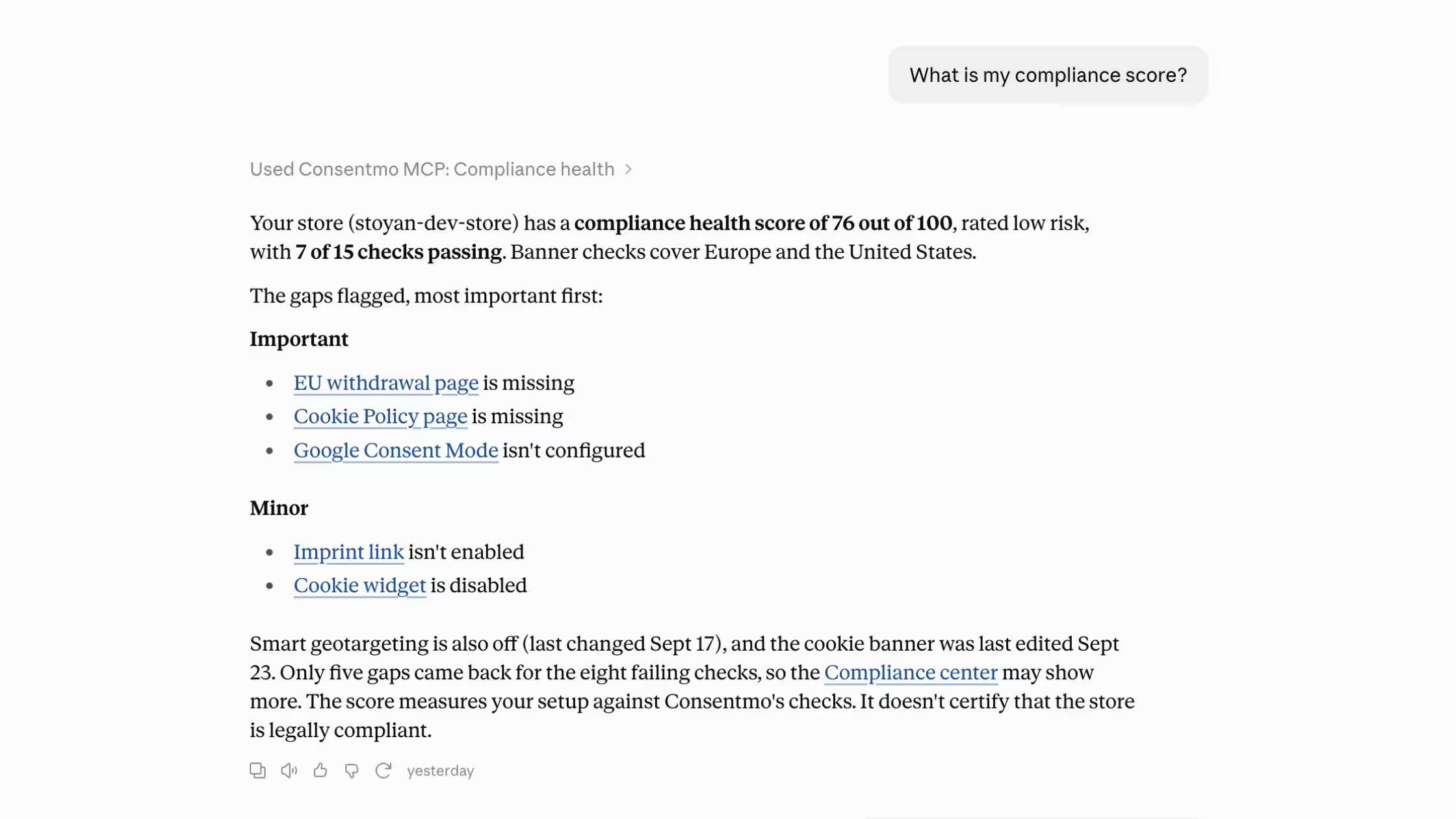
Assistants help. You still publish banner, tracker, and policy changes in Consentmo (and theme embeds where required).
How this fits the rest of Consentmo
We're already putting AI to merchant use inside the app:
- AI-powered cookie categorization in Tracker Manager
- AI-powered bulk alt text generation with Alt Text Manager
- We're fully integrated with Sidekick
Conclusion
Consentmo’s ChatGPT, Claude, and Muse connectors bring compliance health, trackers, consent rates, and privacy-request context into the AI chats your team already runs, with read-only access and short-lived keys. Connect from Integrations, approve once, and start with the in-product sample questions. For deeper setup changes, keep using Consentmo admin, and keep Sidekick for the same class of answers inside Shopify.


.avif)