in-app scanner

Tracker Manager & AI Cookie Scanner

Run a scan to see every cookie, script, pixel and tracker on your store - then categorize them for transparency & compliance.
Circular chart showing 97 trackers by category: 27 necessary, 41 preferences, 16 statistics, 12 marketing, and 1 unclassified, with boxes listing 97 total trackers, 61 cookies, 21 scripts, 10 storage, and 5 pixels and others.
Scan Your Entire Shopify Store And Audit Each Tracker
Run a comprehensive scan to uncover every cookie, script, and hidden tracker active on your store. Get the visibility you need to ensure full compliance. Use built-in AI tools to categorize any unclassified cookies.
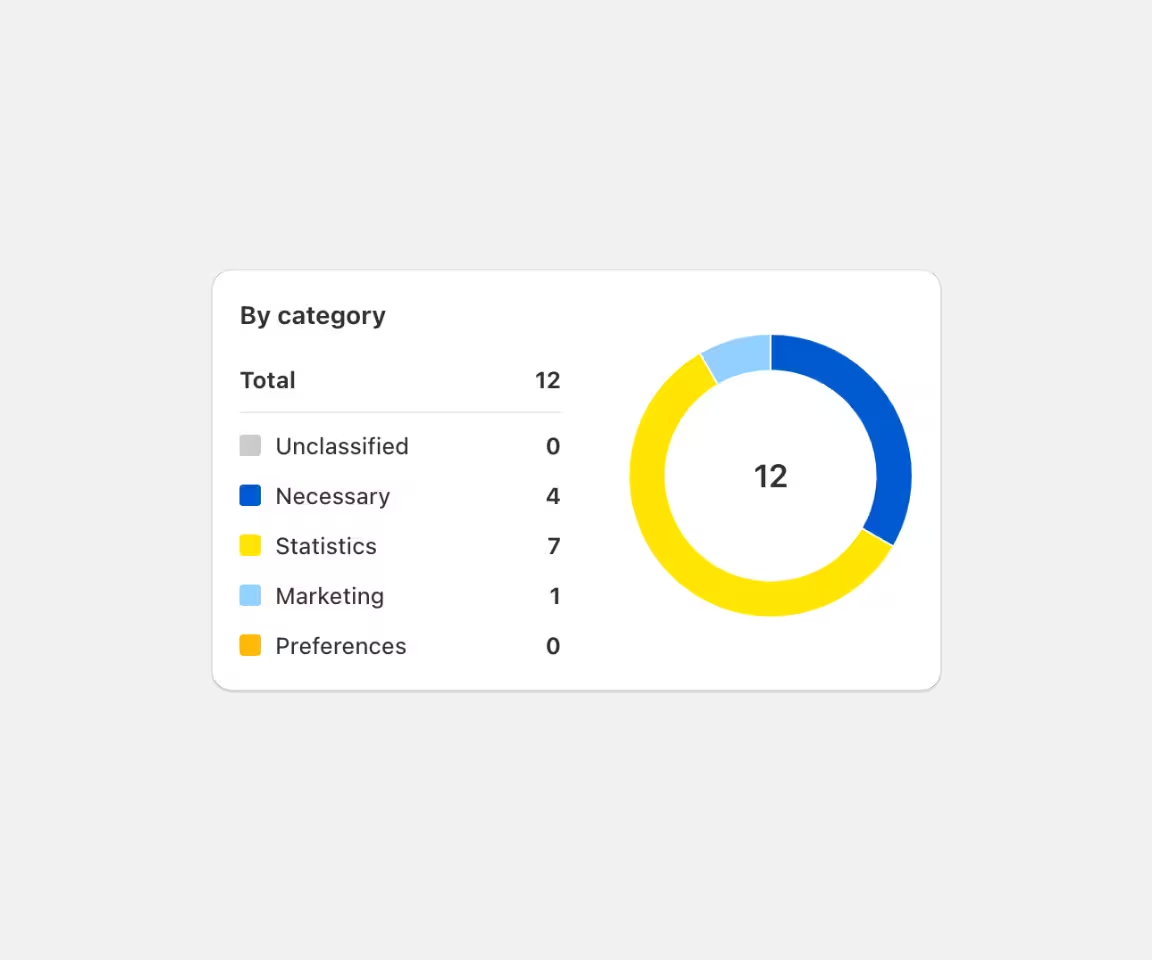
Donut chart showing 12 total items by category: 4 necessary (blue), 7 statistics (yellow), 1 marketing (light blue), and 0 unclassified or preferences.
Cookies
Detect 1st and 3rd party cookies from Shopify, apps, and external integrations.
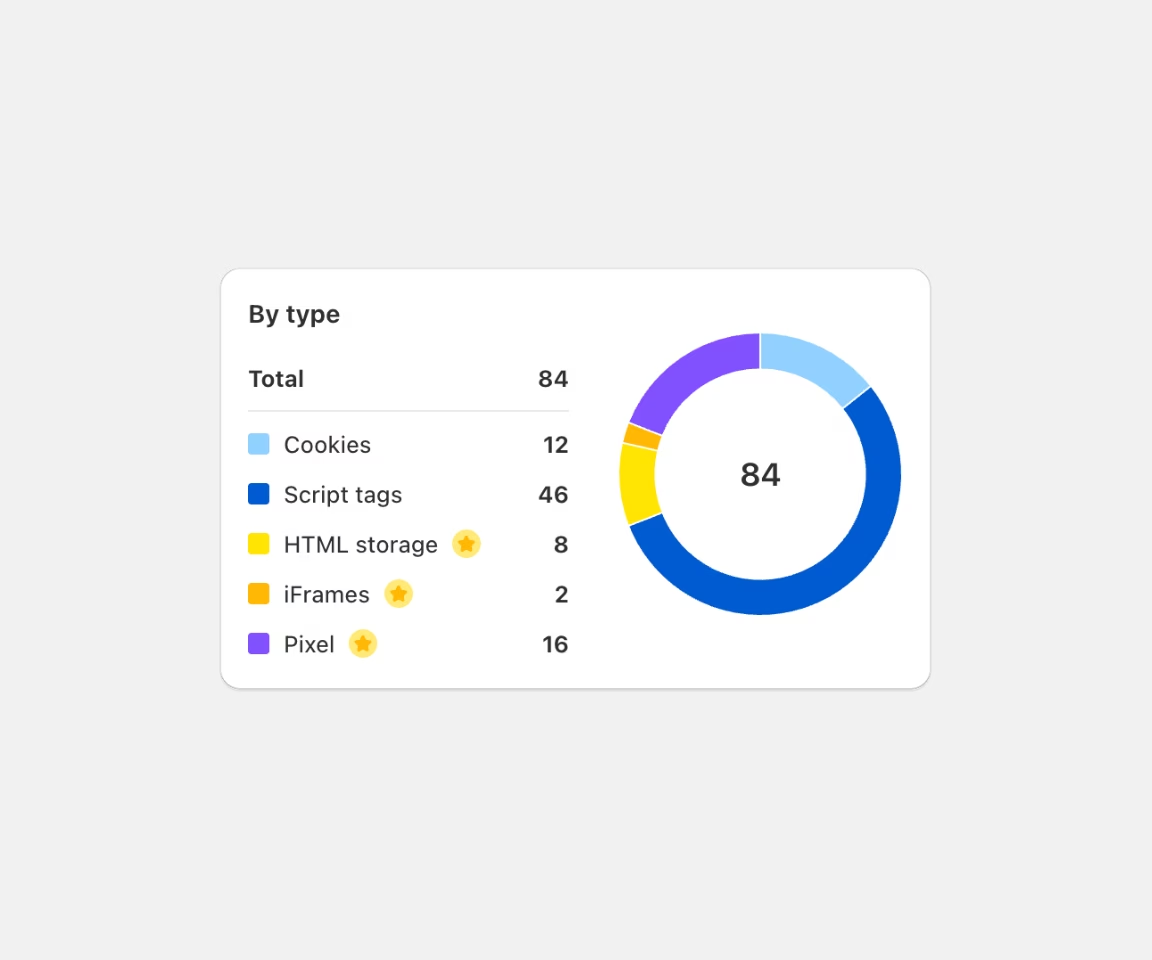
Donut chart showing tracker manager scripts by type: 12 cookies, 46 script tags, 8 HTML storage, 2 iFrames, 16 pixel, total 84.
Scripts
Identify JavaScript files loaded by your theme that could be collecting user data without consent.
List of trackers from Shopify, Microsoft Clarity, Microsoft, Meta Platforms, Inc., and Loox, showing the number of trackers, scripts, storage, pixels, and cookies each uses.
Pixels & Beacons
Find hidden tracking pixels (like Hotjar or from other apps) to ensure they only fire when allowed.
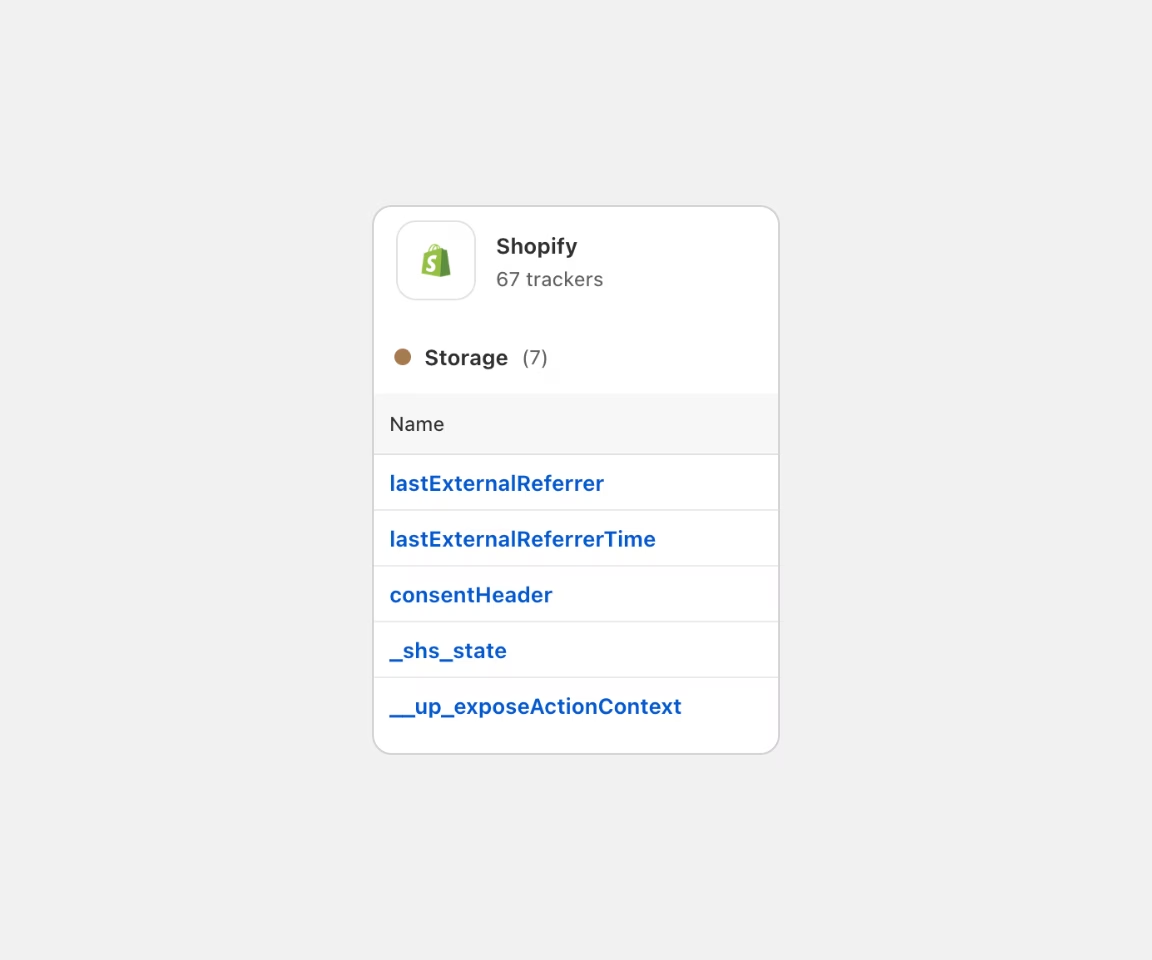
Shopify tracker manager storage panel showing 67 trackers and 5 storage names including lastExternalReferrer and consentHeader.
Local Storage
Monitor localStorage and sessionStorage entries that persist across user sessions.
Over 60% of stores have hidden compliance issues
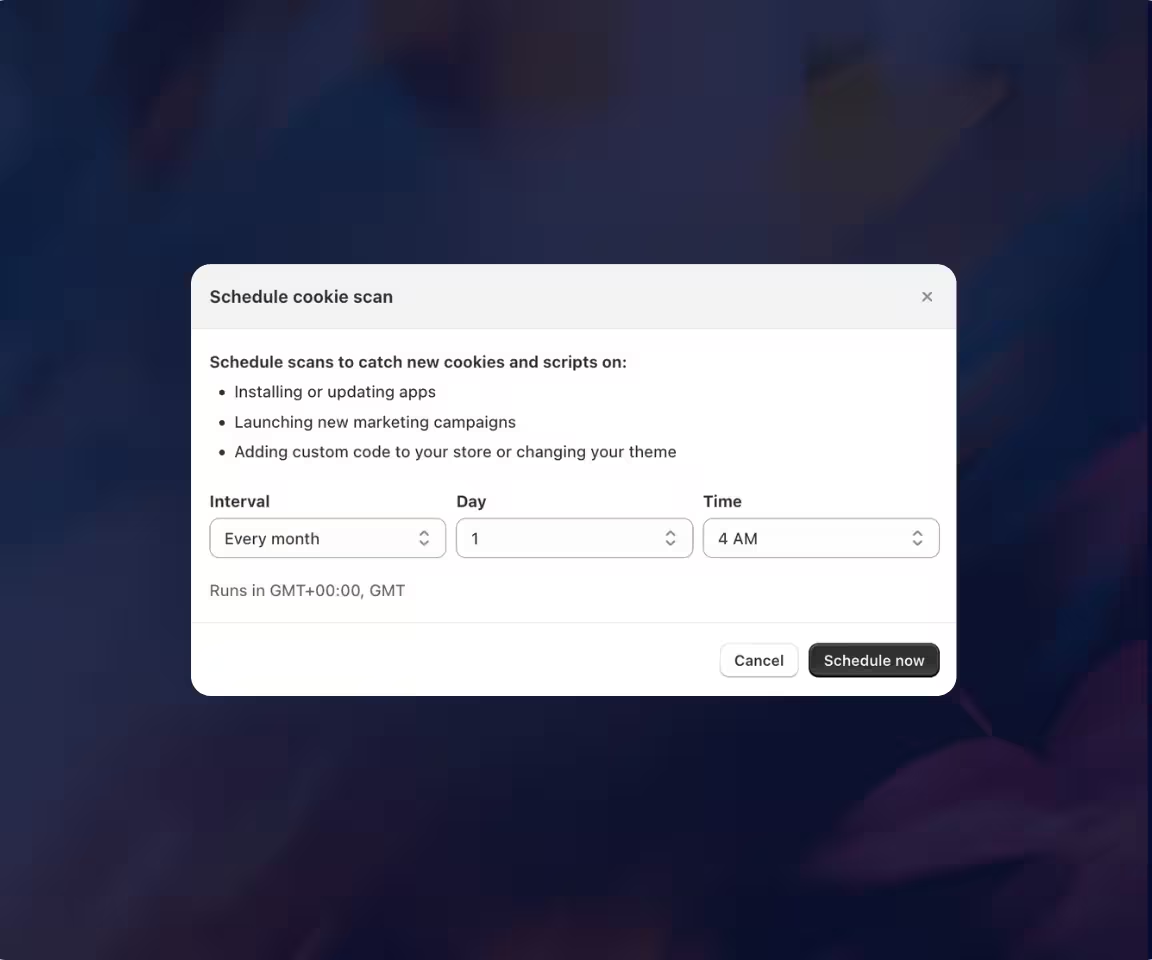
Stop manual checking. Schedule weekly scans to automatically detect and categorize new trackers before they become a liability.
guide

Tracker Manager & AI Scanner by Consentmo

Your store changes every time you add an app or tag. Our scanner ensures your compliance settings keep up.
How the Tracker Manager helps your store:
Manual Audit Status
Automatically uncover every cookie, script, and hidden pixel active on your store. Get full visibility into what’s tracking your customers.
Automated Scheduled Scans
Schedule weekly or monthly scans to catch new scripts added by third-party apps. Stay compliant as your store evolves without lifting a finger.
AI-Powered Categorization
Our AI instantly identifies and groups trackers into Necessary, Statistics, or Marketing categories for GDPR/CCPA.
Detailed Cookie Banner Preferences
Give your visitors total control. Every tracker found by our scanner is listed in a rich, easy-to-navigate preferences tab on your Cookie banner.
Transparent Reporting
Generate detailed scan history reports to prove compliance. Show auditors and customers exactly how you handle their data privacy.
5 stars
5/5
1 800+ Reviews on the Shopify App Store
FAQ

Tracker Manager & AI Scanner – FAQ

Quick answers to help you get the most out of your scans.
Have more questions?
Contact our support team
Contact Us
How does the Tracker Manager help Shopify stores?

The Tracker Manager is a centralized dashboard that allows Shopify merchants to monitor, categorize, and control every script, cookie, and pixel active on their storefront. It acts as a "Privacy Command Center," ensuring that no third-party app or marketing tag tracks user data without proper legal consent, all available inside the Consentmo app admin.

How does the AI Cookie Scanner work?

The AI Cookie Scanner automatically crawls your store to detect first and third-party trackers. Unlike basic scanners, our AI-powered engine identifies the specific provider (e.g., Meta, Google, TikTok) and automatically suggests the correct compliance category -Necessary, Statistics, or Marketing, saving merchants hours of manual data entry.

Why should I show a full list of trackers in my Cookie banner?

Listing every tracker in a rich Preferences banner tab builds transparency and customer trust. Under GDPR and CCPA, users have the right to know exactly what technologies are processing their data. By providing a granular view, you reduce "privacy anxiety," which can lead to higher opt-in rates and lower bounce rates compared to generic banners.

Does the scanner detect hidden pixels and "risky" scripts?

Yes. The scanner identifies all risky pixels - trackers that fire before a user has interacted with your cookie banner. This is a critical compliance risk that can lead to ad account suspensions on platforms like Meta and Google. Consentmo flags these issues so you can implement blocking rules immediately.

How often should I scan my Shopify store for cookies?

We recommend running a scan every time you install a new Shopify app or update your theme. For the highest level of protection, our Plus Plan offers Automated Scheduled Scans (weekly or monthly) to ensure your cookie policy and preferences tab are always 100% accurate and audit-ready.

Can I manually categorize a cookie if the AI misses it?

Absolutely. While our AI database covers over 98% of known trackers, you have full manual override. You can edit the provider name, duration, and category for any script to match your specific legal requirements or custom store setup.

Is the Integration Scanner available on all plans?

The Integration Scanner is available on all paid Consentmo plans and can be used anytime to verify your tracking setup.

Built for Shopify

Consentmo is the go-to Shopify compliance app

Manage consent, privacy, and accessibility in one place. From Google Consent Mode to global regulations, Consentmo keeps your store compliant while preserving your data and performance.
Get Started With Consentmo
5 stars
5/5
1 800+ Reviews
Banner displaying cookie consent options with toggles for necessary, statistics, marketing, and preferences cookies, accessibility menu with options like Bigger Cursor, Tooltips, Dyslexic Fonts, Bionic Reading, Hide Images, and compliance badges for GDPR, US Laws, PIPEDA, NZPA, APA, LGPD, APPI, and POPIA.