TLDR
- Consentmo now lets every merchant create a cookie policy page directly from their tracker scan, no manual writing required.
- The free version generates a static snapshot. The Max version (Smart Cookie Policy, $99/month) auto-publishes an updated page after every scan, keeping your disclosures in sync with your actual cookie inventory without any manual work.
- Most Shopify store owners know they need a privacy policy. Fewer realize they also need a dedicated cookie policy page, a public document that lists every cookie and tracking technology active on their store, organized by category, and accessible to any visitor at any time.
- The requirement comes from some of the strictest privacy laws on the planet: GDPR in the European Union, UK GDPR, Switzerland's nFADP, Quebec's Law 25 in Canada, California's CCPA/CPRA, and a growing list of other US state laws. Each of them requires transparency about the tracking tools you deploy.
- Consentmo's new Cookie Policy Page feature solves this end to end. Here is exactly how it works, what each plan gets, and how to set it up.
What Is a Cookie Policy Page?
A cookie policy page is a dedicated, publicly accessible page on your store that discloses every cookie and tracking technology in use: what each one does, who provides it, how long it lasts, and which consent category it belongs to (Necessary, Preferences, Statistics, or Marketing).
This is different from your privacy policy. A privacy policy covers data collection broadly. A cookie policy page is specific to tracking technologies and is typically required to accompany your cookie consent banner. When a visitor clicks "Manage preferences" or asks "what exactly are you tracking?", the cookie policy page is what they should find.
Without one, you risk non-compliance with regulations that require affirmative disclosure of tracking practices before or at the moment of consent.
Introducing the New Smart Cookie Policy Page
Consentmo now includes a built-in Cookie Policy page for your Shopify store. Instead of maintaining a separate static document, the page generates directly from your cookie scan data, stays current as your tracker list changes, and publishes to your storefront in a few clicks.
Here is everything you need to know about where to find it, how to set it up, and what each setting controls.
Where to Find It in the Consentmo App
There are two entry points inside Consentmo:
1. Cookie Manager header, once Smart Cookie Policy is active, a status widget appears at the top right of the Cookie Manager. It shows whether the page is on or off, when it was last updated, and gives you direct links to edit the page or preview it on your storefront.
2. Privacy Center → Cookie Policy tab, this is the main setup area. Navigate to Privacy Center, click the "Cookie policy" tab at the top, and you will see the Smart Cookie Policy card with the Max badge and a "Create page" button.

How to Set Up
he Smart Cookie Policy requires an Max plan ($99/month). Once on Max, go to Privacy Center → Cookie Policy and click "Create page".
The setup flow has three tabs: Setup, Design, and Content.
Setup Tab
The Setup tab controls how and where the page lives on your storefront.
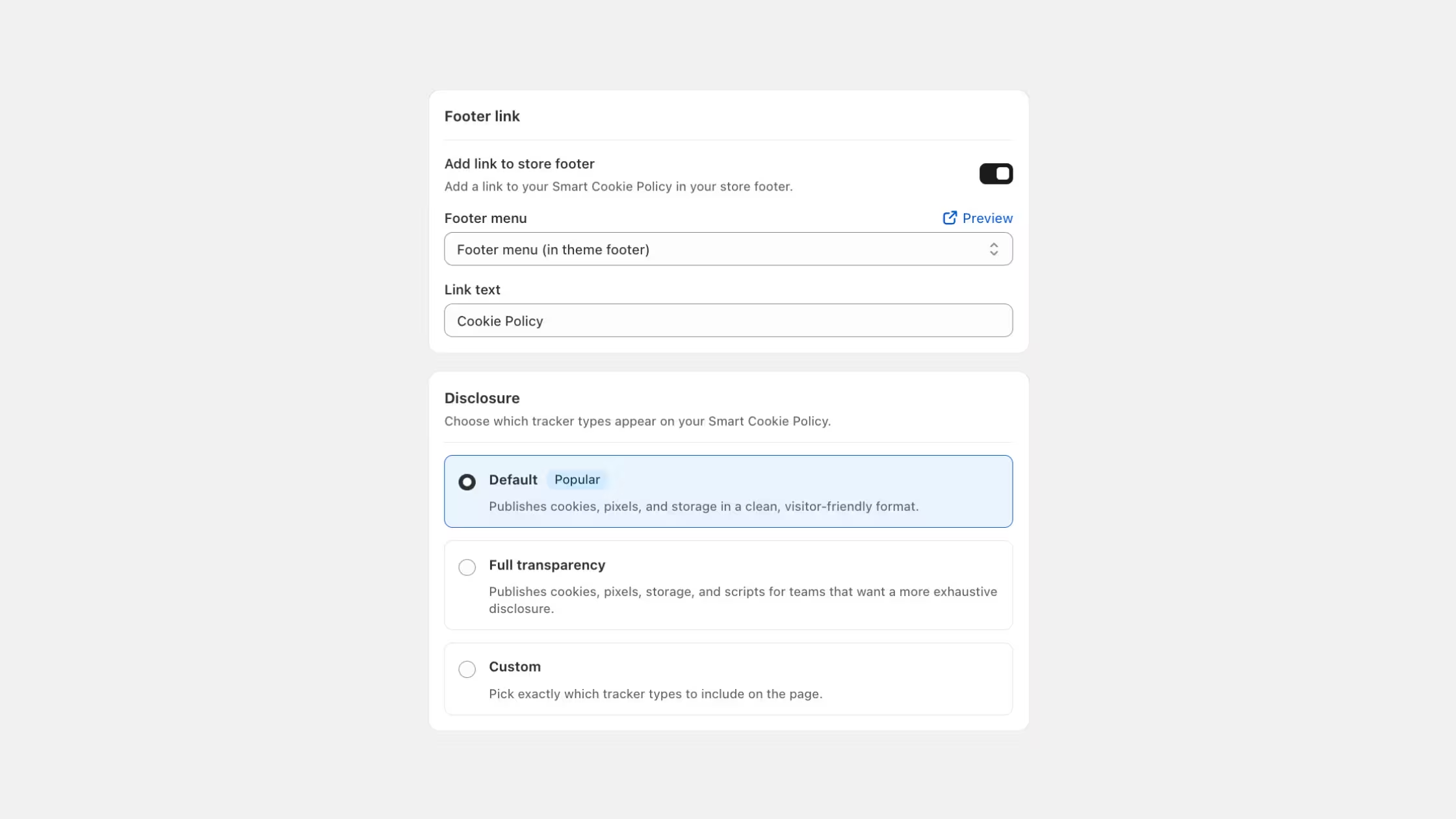
Footer link. Toggle this on to add a "Cookie Policy" link to your store's footer automatically. You can choose which menu in your theme the link appears in (for example, "Footer menu (in theme footer)") and customize the link text. The default is "Cookie Policy."
Page URL slug. The page publishes at this path on your store. The default is cookie-policy, so your page URL becomes yourstore.com/pages/cookie-policy. You can change this slug before first publication.
Disclosure mode. This is one of the most important settings. It controls which tracker types appear on the public page:
- Default (recommended): Publishes cookies, pixels, and storage in a clean, visitor-friendly format. This covers the vast majority of what privacy laws require disclosure of.
- Full transparency: Adds scripts to the above list. Suited for stores or brands that want exhaustive technical disclosure.
- Custom: You choose exactly which tracker types appear. Use this if you have a specific reason to include or exclude certain tracker categories.
Consentmo recommends the Default mode for most stores.
Design Tab
The Design tab gives you control over how the published page looks, with a live preview on the right side of the screen as you make changes.
Color & Styles. Set the background color, text color, button text color, and button color. These can match your store's brand or theme.
Display options. Four toggles let you fine-tune the page experience:
- Show tracker counts, displays the number of trackers in each category (e.g. "57 trackers" next to Necessary). Recommended on, as it demonstrates transparency.
- Expand categories by default, when on, all tracker categories open automatically when the page loads. When off, visitors click to expand each section.
- Show "Change preferences" button, adds a prominent button at the top of the page so visitors can open your consent banner and update their choices at any time. Recommended on.
- Show unclassified category, includes trackers that have not yet been assigned to a consent category. Leave off unless you want full disclosure of unclassified items.
Custom CSS An open field for any additional styling you want to apply to the page (for example, adjusting padding with .cookie-policy-page { padding: 24px; }).

Content Tab and Multilingual Support
The Content tab controls all the text on the published page, and supports multiple languages.
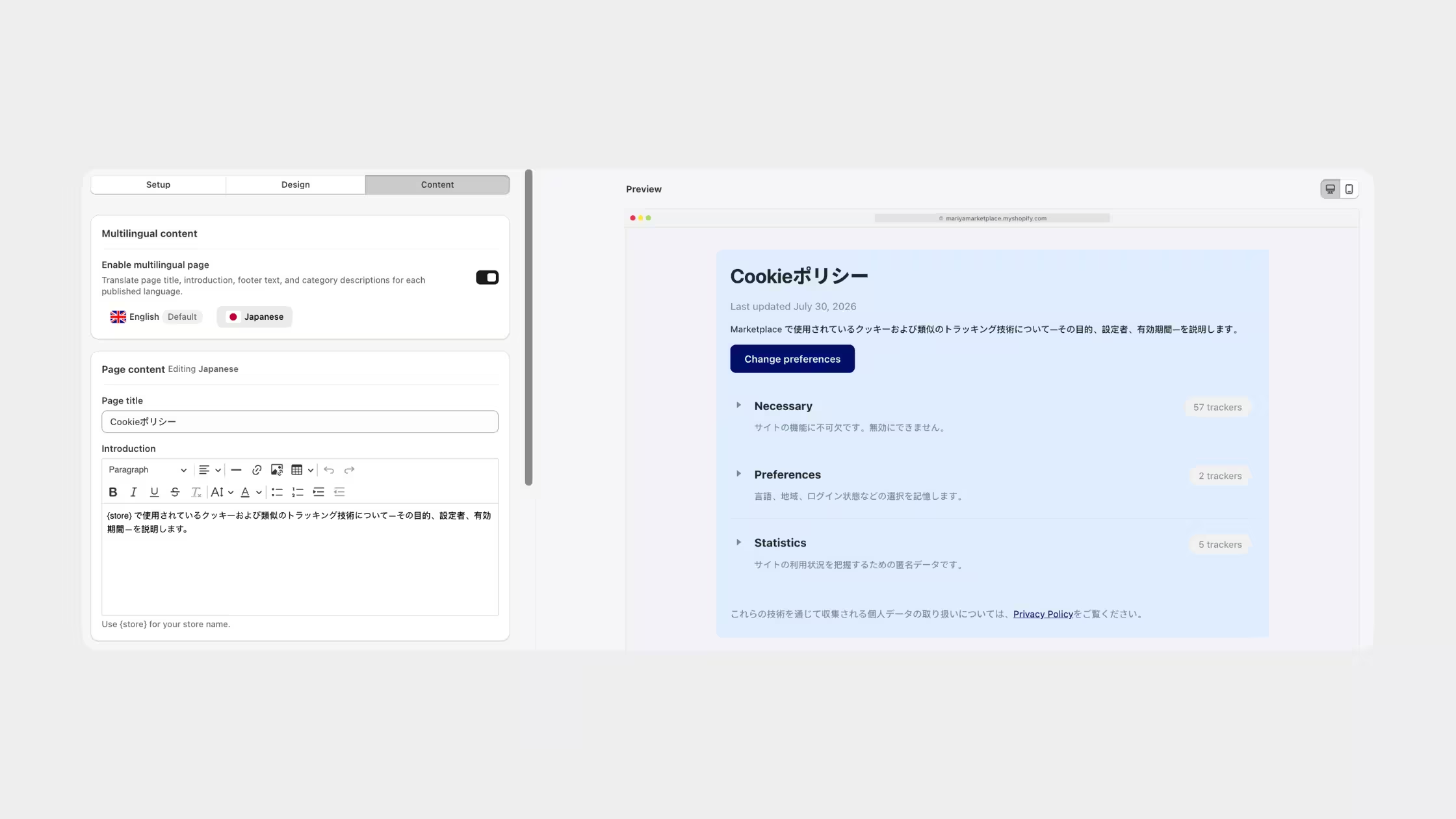
Multilingual content Toggle on to translate the page into every language your store serves. Consentmo translates the page title, introduction, footer text, and all category descriptions per published language. You can manage each language from the tab row at the top of the Content section (for example, English as default, with Japanese, French, or any other language you add).
Page content
- Page title: Defaults to "Cookie policy." Change it to match your branding or regulatory language requirements.
- Introduction: A rich-text editor where you can write a short explanation of what the page covers. Use the
{store}placeholder and Consentmo inserts your store name automatically. The default reads: "This policy explains how {store} uses cookies and similar technologies, what they do, who provides them, and how long they remain on your device. You can change your choices at any time using Cookie settings."
Category descriptions. Short descriptions shown under each consent category heading on the published page. All four are editable:
- Necessary: "Required to provide the website and services you request. These technologies cannot be switched off through our cookie settings."
- Preferences: "Remember your choices such as language, region, and login state."
- Statistics: "Help us understand how visitors use the site so we can measure and improve its performance."
- Marketing: "Track you across sites to show relevant ads and measure campaigns."
- Unclassified: "Trackers that have not yet been assigned to a consent category."
If you edit a description and want to go back, a reset button restores the default text.
Footer text. Text shown at the bottom of the page after the full tracker list. Use the {privacy_page} placeholder to insert a link to your Privacy Policy from your Consent Banner settings automatically. The default footer reads: "To learn how we handle personal data collected through these technologies, see our {privacy_page}."
What the Published Cookie Policy Page Looks Like
Once published, your Smart Cookie Policy page is a clean, professional disclosure document. At the top, visitors see the page title and a "Last updated" date, Consentmo updates this timestamp automatically after each scan, so visitors always know how current the information is.
Below the intro text, a "Change preferences" button lets visitors open the consent banner at any time without having to hunt for it.
The main body organizes trackers into expandable categories. Each category shows:
- The category name and description
- A tracker count (e.g. "57 trackers" for Necessary)
- Expandable vendor rows (e.g. Shopify, Consentmo, Shopify Checkout) with cookie counts per vendor
The footer closes the page with the privacy policy link.

The layout uses a clean grid structure and works on both desktop and mobile. The page is auto-generated at your chosen URL slug and linked from your store footer, no theme editing required.
Automatic updates: Every time your scheduled scanner runs and detects new or changed cookies, Smart Cookie Policy re-publishes the page with the updated tracker inventory. You do not need to touch anything. The "Last updated" date refreshes, the categories adjust, and the vendor counts update, all automatically.
Important: Scheduled scanning requires a Plus plan or higher. Smart Cookie Policy requires Max plan. To enable automatic page updates, make sure the scanner toggle is on inside Cookie Manager. If the scanner is off, the page publishes but will not update after future scans.
How to Set Up the Manual Cookie Policy Page (Free)
Consentmo includes a free option for adding a cookie policy to your store. It does not create a standalone page automatically. Instead, it gives you an HTML table of your scanned trackers that you embed manually into any existing page on your store.
Steps:
- Run a tracker scan from Cookie Manager, or use your most recent scan results.
- Go to Cookie Banner → Behavior → Cookie list and policy table.
- Scroll to the "Copy all tables HTML" section and click Copy.
- Paste the copied HTML into your existing Privacy Policy page or a new page on your Shopify store.
Limitations to keep in mind:
The copied HTML is a snapshot of your trackers at the moment you copied it. It does not update automatically. If you add new tools next month and run a fresh scan, the embedded table on your page stays the same until you repeat the copy-paste process manually. The page design is also entirely on you, there are no built-in styling controls or layout options.
Those are the two core limitations the Smart Cookie Policy resolves: auto-updating content after every scan, and a fully designed, ready-to-publish storefront page with no manual work required.
Which Laws Require a Cookie Policy Page?
The requirement to publicly disclose your cookie and tracker use appears in several major privacy frameworks:
European Union, GDPR
GDPR requires that consent for non-essential cookies be informed. A dedicated cookie policy page, listing each cookie's purpose, provider, and duration, is the standard way to satisfy the transparency requirement. The GDPR applies to any store that sells to EU residents, regardless of where the store is based.
United Kingdom, UK GDPR
Post-Brexit, the UK maintains its own equivalent of GDPR. Disclosure requirements for cookies are functionally identical to the EU version.
Switzerland, nFADP
Switzerland's revised Federal Act on Data Protection requires transparency about data processing, including tracking technologies used on websites serving Swiss residents.
Quebec, Canada, Law 25
Quebec's privacy law requires organizations to publish a confidentiality policy that includes information about technology products that collect personal information, including cookies. A separate, accessible cookie disclosure page supports compliance.
California, CCPA / CPRA
The California Consumer Privacy Act and its amendment CPRA give consumers the right to know what personal information is collected about them. Businesses subject to CCPA must disclose the categories of data collected, which covers cookie-based tracking. A cookie policy page covering tracker categories and purposes is a key part of satisfying this disclosure requirement.
Other US states
Connecticut, Colorado, Virginia, Utah, Texas, Oregon, and other states with active privacy laws follow similar transparency and disclosure principles. As US state privacy law continues to expand, a cookie policy page is increasingly a baseline expectation rather than an optional extra.


_converted.avif)