


Key Takeaways
- An accessibility statement tells shoppers you commit to an inclusive storefront, names the standards you follow (such as WCAG), and gives them a clear way to report barriers.
- W3C WAI recommends a commitment, the standard you apply, and contact details at minimum, plus known limitations and measures you take.
- Put the page on a stable URL and link it from the sitewide footer with consistent link text such as “Accessibility Statement.”
- With Consentmo Web Accessibility, you generate a hosted statement, edit content and design, add business contact details, enable multilingual versions from your Shopify languages, add a footer link, and preview before go-live.
- See a live example on Consentmo’s own accessibility statement.
What is an accessibility statement?
An accessibility statement is a public page that explains how your website supports people with disabilities, which guidelines or laws you aim to follow, what tools or practices you use, and how visitors can contact you if they hit a barrier.
According to the W3C Web Accessibility Initiative, statements help you:
- Show users you care about accessibility and about them
- Give clear information about the accessibility of your content
- Demonstrate commitment and social responsibility
In some contexts a statement is required. W3C notes public bodies under the EU Web Accessibility Directive as one example, and points to its Web Accessibility Laws & Policies list for jurisdiction-specific rules.
For private ecommerce brands, a statement does not replace real accessibility work on product pages, checkout, and themes. It documents your intent, your progress, and a feedback path.
Why it matters for Shopify merchants
Trust and clarity for shoppers
People often open an accessibility statement after something goes wrong: a control they cannot reach with a keyboard, text that fails contrast checks, or a third-party widget that blocks assistive tech. Plain-language guidance and a direct contact option reduce frustration.
W3C stresses writing for users in simple language, not developer or legal jargon, and explaining limitations in everyday terms (for example, “videos do not have captions” instead of citing a success criterion number alone).
Alignment with common standards and laws
Many digital teams reference WCAG (Web Content Accessibility Guidelines) as the technical bar. The U.S. Department of Justice’s guidance on web accessibility and the ADA discusses barriers on websites and points readers toward WCAG as widely recognized guidelines. Merchants that sell into the EU also track the European Accessibility Act and related storefront obligations. A statement is a practical place to name the standards you target (for example WCAG 2.2 Level AA) and to be honest about gaps.
U.S. federal agencies follow separate Section 508 rules. Section508.gov still offers useful patterns for any organization: name the standard, list known limits, offer feedback, and show a last-updated date. Shopify merchants can borrow that structure without pretending they are a federal site.
Risk awareness without false claims
Accessibility-related complaints and lawsuits against online stores remain a live topic for merchants. A statement is not a shield by itself. Overstating conformance (“fully ADA compliant”) when the theme still has serious issues can backfire. Pair the page with ongoing fixes, testing, and tools such as an accessibility widget, and keep the wording accurate. For broader merchant context, see Consentmo’s guides on accessibility lawsuits and Shopify stores and the U.S. response to ADA website lawsuit trends.
Operations and brand consistency
When the statement lives next to your accessibility tooling, you update copy, contacts, and languages in one place instead of hunting a forgotten Shopify page after a rebrand or a new support email.
What a strong statement includes
W3C’s minimum set:
- Commitment to accessibility for people with disabilities
- Standard applied (for example WCAG 2.2)
- Contact information when users encounter problems
W3C also advises adding known limitations, measures your organization takes, technical prerequisites (browsers, assistive tech), testing environments, and references to applicable laws where relevant.
Consentmo’s starter content follows this structure so you start from a complete outline, then tailor it to your brand.
Where it belongs on your store
Dedicated page URL
Publish a dedicated page shoppers can bookmark and share. Consentmo hosts the statement for you and uses a storefront path such as:
/pages/accessibility-statement
Keep that URL stable. If you change paths often, footer links and external references break.
Sitewide footer link (primary placement)
W3C says statements should be easy to find, with links from the footer, help menu, sitemap, about page, and other prominent areas, using consistent link names.
Section508.gov is stricter for federal sites: link directly from the sitewide footer with link text such as “Accessibility” or “Accessibility Statement,” and avoid burying the statement only under a generic “Policies” subpage.
For Shopify merchants, treat the footer as the default:
- Enable a footer link to the statement
- Use clear link text: Accessibility Statement (or the same label in each storefront language)
- Place it with other trust links (privacy, terms, contact), not behind a nested policy hub only
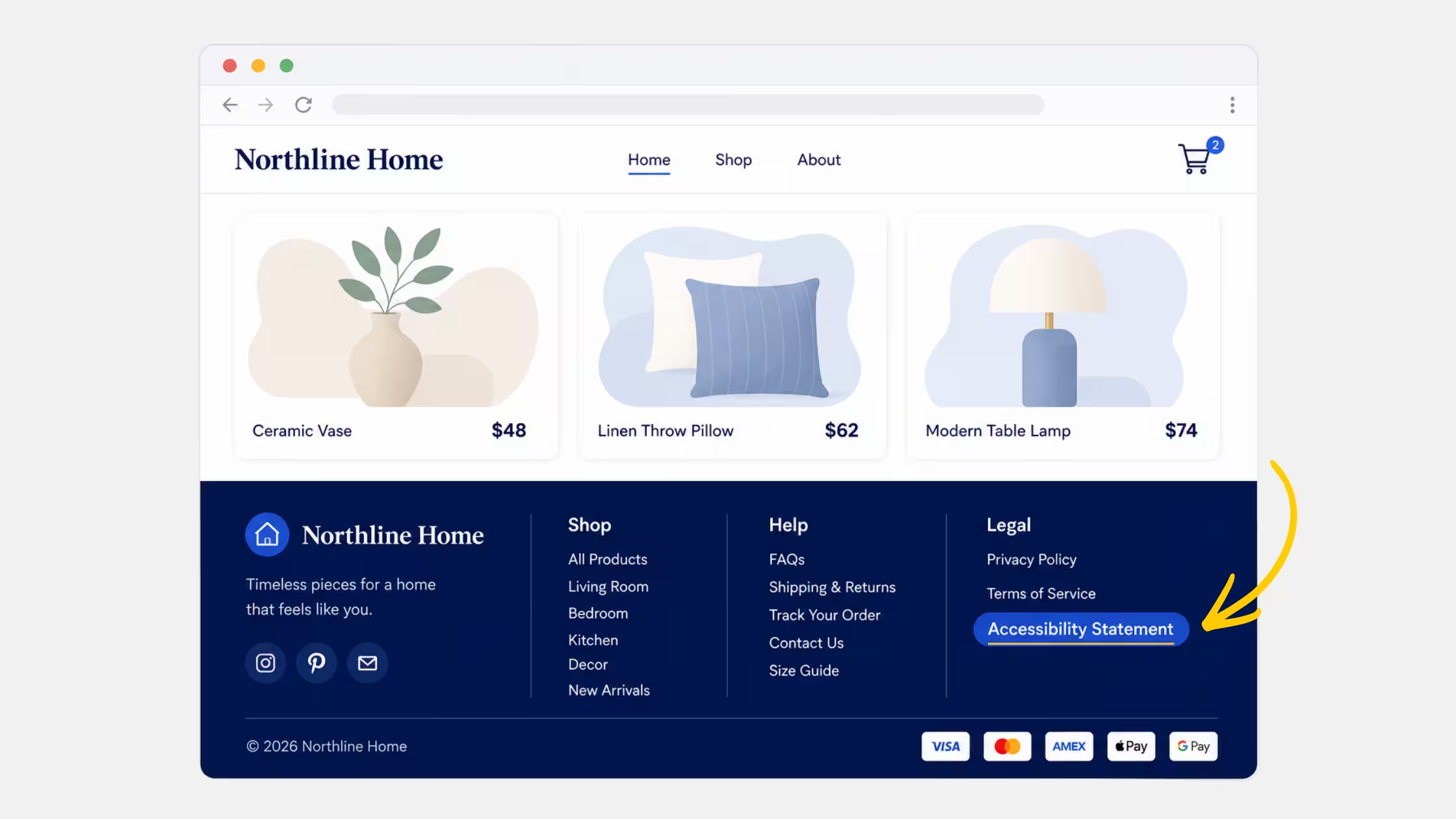
Optional extras that still help: About page, help center, and your accessibility widget’s own link field if you use one.
Multilingual storefronts
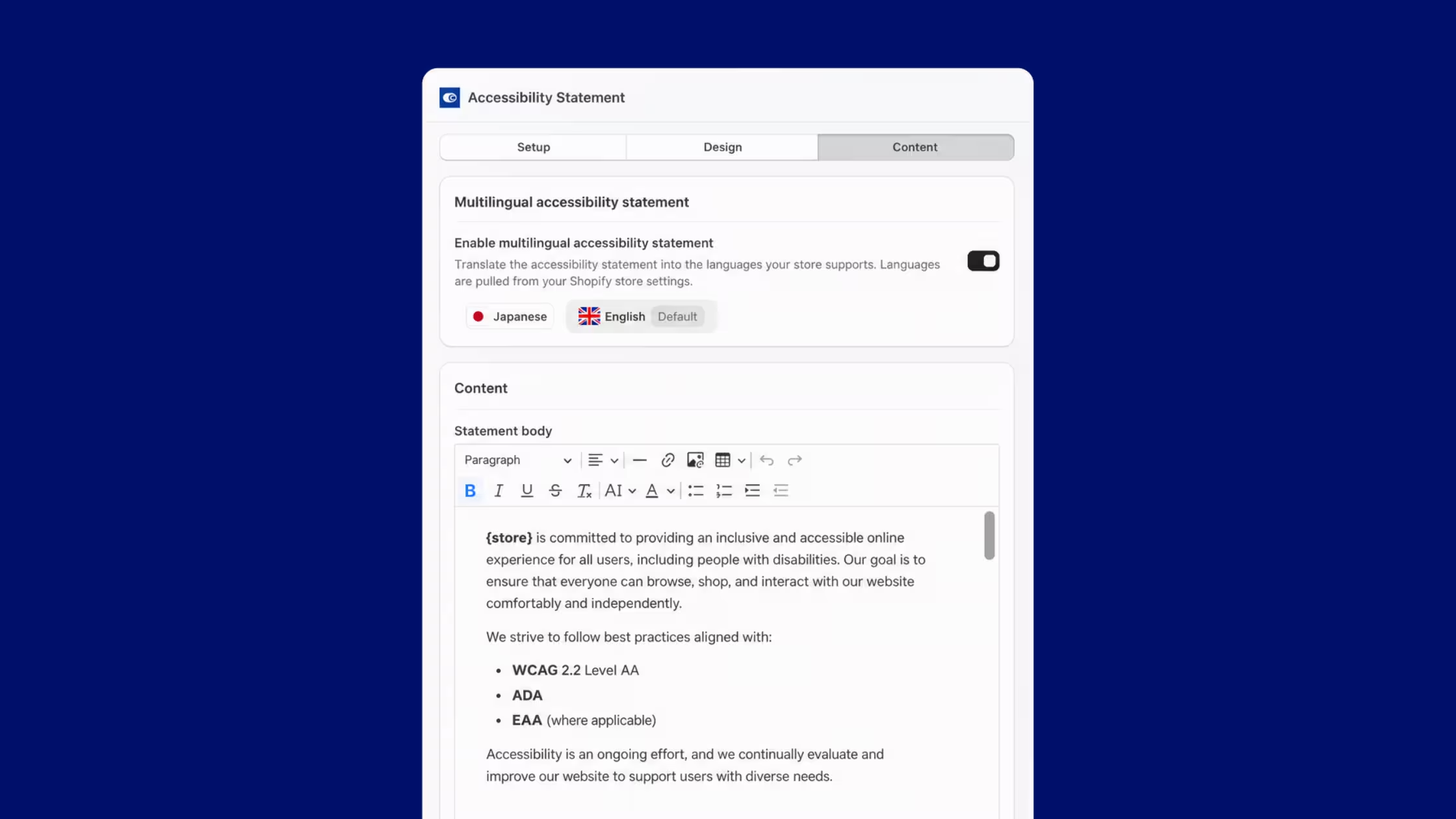
If Shopify serves multiple languages, offer matching statement content. A Japanese shopper who only finds an English legal page loses the point of the statement. Consentmo can pull languages from your Shopify settings and manage versions from the same Accessibility Statement interface.
How to generate it with Consentmo
Consentmo’s Accessibility Statement feature (part of Web Accessibility) lets you publish a clear accessibility commitment without hand-building and maintaining a separate page from scratch.
What you get
- Hosted Accessibility Statement, dedicated page published from Consentmo
- Ready-to-use content, structured draft covering practices, tools, and ongoing improvements
- Customizable content, edit the body to match your business and approach
- Business contact details, email, phone, and business information for barrier reports
- Footer link setup, add the statement to your Shopify store footer
- Live preview, review changes before shoppers see them
- Multilingual support, versions aligned with languages your store supports
- Design controls, background and text colors, plus custom CSS when you need tighter brand match
- Ongoing edits, update practices, tools, or contacts inside Consentmo instead of rebuilding the page
Step-by-step setup
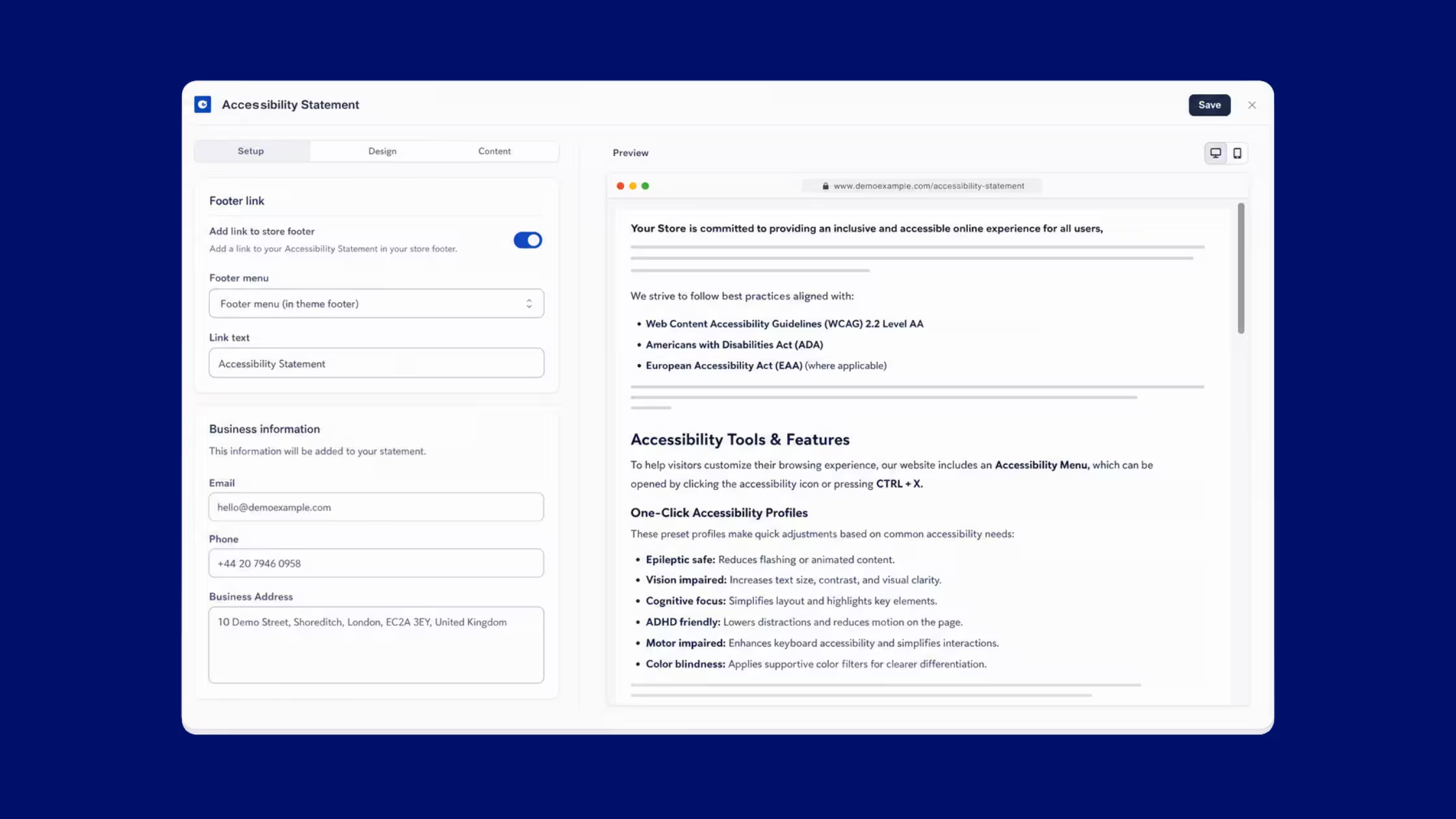
1. Open Web accessibility → Statement In Consentmo, go to Web accessibility and open the Statement tab. Turn on Accessibility Statement (Plus). Confirm the page URL (for example /pages/accessibility-statement), then choose Manage page.
2. Complete Setup
- Toggle Add link to store footer and select the footer menu used in your theme
- Set Link text (keep it consistent storewide)
- Fill Business information: email, phone, and business address that should appear on the statement so visitors can report issues
3. Adjust Design
- Set page background and text colors so the statement matches your brand
- Add custom CSS when you need spacing or typography tweaks (for example padding on the statement container)
4. Edit Content
- Start from the structured statement body
- Enable multilingual accessibility statement when you serve more than one language; languages come from your Shopify store settings
- Describe real measures on your store: accessibility menu or widget, one-click profiles, text and color adjustments, keyboard support, and how you handle third-party limits
- Name the standards you follow in plain language (WCAG 2.2 Level AA, ADA, EAA where applicable)
- Keep a clear Feedback & contact section
5. Preview and save Use the live preview beside the editor, then save. Spot-check the footer on desktop and mobile, and open the public URL in a private window.
Tips for accurate copy
- Describe features you actually offer today
- List third-party and UGC limits honestly
- Prefer plain language over stacked legal disclaimers
- Refresh the “Updated on” date when you change practices or contacts
- Point readers to how they open your accessibility tools (icon, shortcut) if those tools exist on the storefront
Real example: Consentmo’s statement
Consentmo publishes its own statement at consentmo.com/pages/accessibility-statement. The live page is a useful reference for structure and tone. It includes:
- A dated commitment to an inclusive experience
- Alignment with WCAG 2.2 Level AA, ADA, and EAA where applicable
- Accessibility tools and features, including an Accessibility Menu (icon or CTRL + X)
- One-click profiles (for example epileptic safe, vision impaired, cognitive focus, ADHD friendly, motor impaired, color blindness)
- Text, display, color, navigation, and reading supports
- Technical approach (semantic HTML, WAI-ARIA, CSS, JavaScript) and compatibility notes for major browsers and assistive technologies such as JAWS, NVDA, and VoiceOver
- Ongoing improvement practices
- Limitations around third-party content and legacy media
- Feedback contacts (email and business address)
Use it as a model for clarity, then rewrite the product-specific sections so they match your theme, apps, and support channels.
Keep the statement current
Accessibility is continuous work. When you change the widget, add apps, rebrand, or move support to a new inbox, update the statement in the same Consentmo screen you used at launch. That habit keeps the footer link honest and keeps feedback flowing to the right team.
Pair the page with the rest of your accessibility stack: region controls, alt text workflows, and regular checks. Feature updates such as region-based controls for web accessibility belong in your internal process and, when relevant, in the “measures we take” section of the statement.
Create your accessibility statement
Shoppers deserve a clear commitment, a named standard, and a way to reach you when the storefront fails them. Host the page on a stable URL, link it from the footer with consistent text, and keep the copy aligned with what your store actually does.
This article is for general information. It is not legal advice. Requirements differ by country, sector, and business model; confirm obligations with qualified counsel for your markets.


_converted.avif)