


_converted.avif)
Consent banners used to be configured at the country level.
If a visitor came from Europe, you showed a GDPR-style banner. If they came from California, you displayed a "Do Not Sell or Share" option.
That approach worked for a while.
But privacy laws are evolving quickly - especially in the United States. Many regulations now apply at the state level, not just nationally.
That's why we've expanded Consentmo’s Smart Geotargeting with a deeper layer of control.
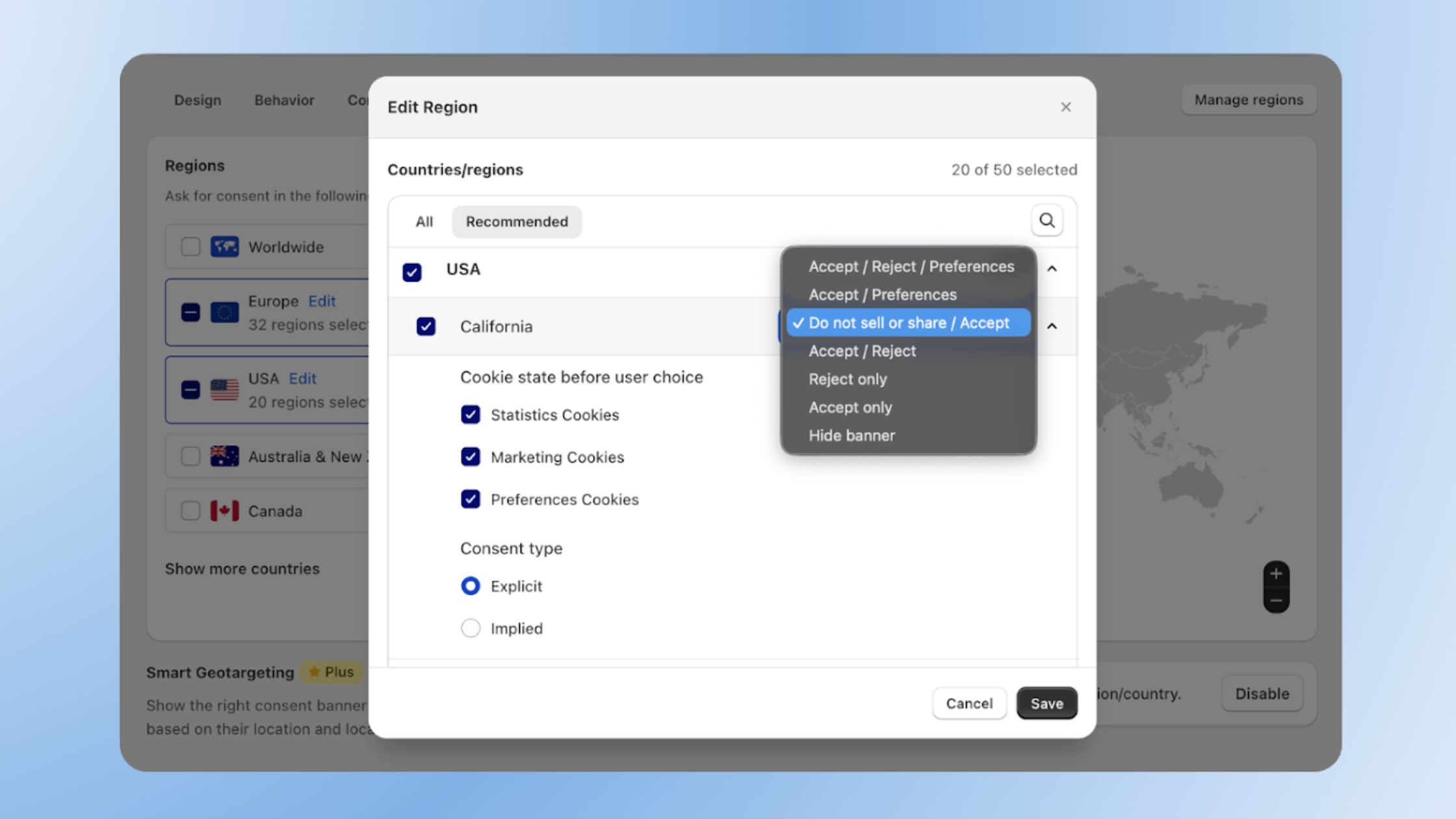
Shopify merchants can now configure cookie category defaults and consent models per state or region, not just per country.
TL;DR
- Consentmo Smart Geotargeting now supports state-level consent configuration
- Merchants can set default cookie categories per state
- Consent type (explicit or implied) can now be selected per region
- Helps Shopify stores adapt to GDPR, CCPA, and other state privacy laws
- Prevents one-size-fits-all cookie banners that may break compliance
The Problem With Country-Level Cookie Consent
When we launched Smart Geotargeting, the main goal was simple:
Show the right cookie banner for the right privacy law.
For example:
- Visitors in Europe see: Accept / Reject / Preferences
- Visitors in California see: Accept / Do Not Sell or Share
This already helped Shopify merchants align their cookie banners with laws like GDPR and CPRA.
But there was still a missing layer. Each consent model had a predefined default state for cookie categories.
That meant merchants could control which banner appeared, but not how cookies behaved before a visitor interacted with it.
As privacy regulations become more specific, that limitation becomes harder to ignore.
New Feature: Cookie Category Defaults Per State
The United States now has 20+ active state privacy laws, including:
California (CPRA), Virginia (VCDPA), Colorado (CPA), Connecticut (CTDPA), Utah (UCPA), Texas (TDPSA), Oregon (OCPA), Montana (MCDPA), Iowa (ICDPA), Indiana (ICDPA), Tennessee (TIPA), Delaware (DPDPA), New Jersey (NJDPA), New Hampshire (NHPA), Kentucky (KCDPA), Nebraska (NDPA), Minnesota (MCDPA), Maryland (MODPA), Rhode Island (RIDTPA), and Florida (FDBR).
These laws don't always treat cookie consent the same way.
Some states expect stricter opt-in behavior, while others focus more on opt-out rights.
With the new update, Consentmo now allows Shopify merchants to configure default cookie category states by state or region.
This means you can control which cookies activate before a visitor makes a choice, depending on their location.
Example setup:
California visitors
- Marketing cookies disabled by default
- Analytics disabled until consent
- "Do Not Sell or Share" option visible
Other US states
- Analytics enabled by default
- Marketing requires consent
European visitors
- All non-essential cookies disabled until explicit consent
Instead of relying on one default configuration, your store can now adapt consent behavior to each region.
Explicit vs Implied Consent - Now Configurable Per Country, State, Or Region
Another important part of the update is the ability to select how consent works in each region.
Merchants can now choose between:
Explicit consent
Cookies activate only after the user clicks Accept or Save my choice after reviewing the cookie categories in Preferences.
This is typically required for GDPR and ePrivacy compliance.
Implied consent
Certain cookies may activate if a visitor continues browsing.
Some jurisdictions allow this model depending on how data is used.
By allowing merchants to choose the consent type per state or region, Consentmo helps Shopify stores align their cookie banner behavior with the legal expectations of each location.
Why This Matters for Shopify Stores
Many Shopify merchants sell internationally.
Your store may receive traffic from:
- Europe
- California
- Canada
- Australia
- multiple US states
Each of these regions has different expectations for cookie consent.
Without geotargeting, most stores use a single cookie banner configuration for everyone.
That can create two problems:
- It may not fully satisfy stricter laws like GDPR
- It may introduce unnecessary friction for visitors in other regions
State-level consent configuration allows Shopify stores to balance compliance and user experience by adapting consent behavior to each jurisdiction.
Smart Geotargeting Now Controls the Entire Consent Experience
With this update, Smart Geotargeting now manages three layers of consent behavior:
- Banner layout per location
- Default cookie category state per location
- Explicit or implied consent model per location
Instead of simply showing a different banner for different countries, your Shopify store can now adapt the entire consent flow depending on where the visitor is coming from.
Privacy laws no longer stop at the country level. Now your consent setup doesn't have to either.
Review Your Global Setup: New Granular Controls Are Live
If you sell to customers in the US, Europe, or across multiple global regions, it’s time to move past "one-size-fits-all" settings.
Log in to your Consentmo dashboard today to explore our new region-level controls. You can now fine-tune exactly how your store handles privacy for every jurisdiction:
- Set Cookie Defaults: Choose which categories are pre-enabled or disabled based on specific state laws.
- Select Consent Models: Toggle between Explicit and Implied consent for individual regions.
- Optimize UX: Ensure visitors only see the restrictions required by their local laws.
Don't leave your compliance to chance. Review your current Geotargeting settings now to ensure your store is fully optimized for a global audience.


.avif)