Activity Log: Know what changed, with account visibility & timestamp
A cookie banner may pass through several hands as a Shopify store grows. A store owner updates the banner text, a team member adjusts a setting, and someone else changes the app plan. Later, a question comes up: what changed, and when?
Activity Log brings those details together in Consentmo. It gives you a history of app activity, including the account associated with each entry, the affected section, and the date and time. For supported settings, you can expand an entry to compare the previous and updated values.
The feature is available on the Max plan under Analytics & Reports > Reports > Activity Log.
TL;DR
- Activity Log records changes across Consentmo, including cookie banner settings, app configuration, and plan changes.
- Each entry shows the date, account, app section, and activity.
- Supported entries include a before-and-after comparison.
- Search, date filters, and export help you find and review activity.
- Activity recording starts from the feature’s activation date. Earlier changes are not available.
- Activity Log is available on the Max plan.
Why keep track of Consentmo app changes?
Your privacy setup can change over time. You might revise the wording on your cookie banner, update a setting, or adjust your plan as your store’s needs change.
When more than one person works in the app, it can be difficult to remember the details of every update. Activity Log gives your team a place to check what happened instead of relying on messages or memory.
It can help you answer questions such as:
- Who changed the cookie banner status?
- When was the banner text edited?
- What was the previous value of a supported setting?
- When did the account move to a different plan?
- Which Consentmo section was affected?
You can also use the log alongside other Consentmo reports. For example, Proof of Consent: Verifiable Cookie Consent Records for Shopify covers records of visitor interactions with the banner. Activity Log provides a separate view of changes and activity within the app.
What Activity Log shows
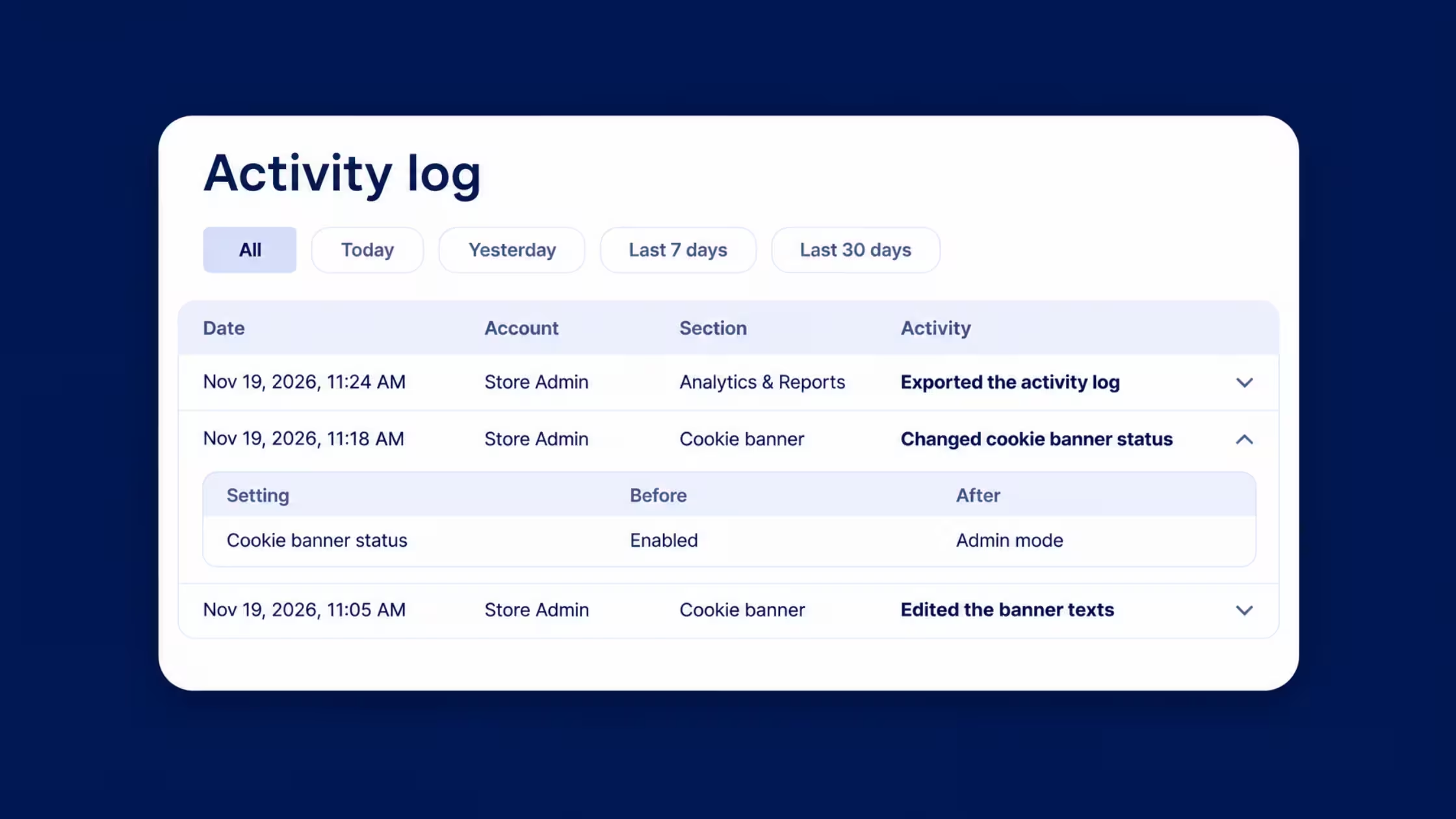
Activity Log presents entries in a table with four main columns:
The log can include changes to cookie banner settings, app configuration, and plan changes. The examples shown in Consentmo include a cookie banner status change, an edit to banner text, and a plan change from Plus to Max.
Some entries may show Consentmo App in the Account column. This gives you context for app activity alongside actions associated with a named account.
Before-and-after details
For supported settings, select an entry to expand it and see the previous and updated values.
For example, an expanded cookie banner status entry can show that the status changed from Enabled to Admin mode. An expanded banner text entry can show which text fields changed and their before-and-after values.
This detail is useful when you need to understand the change itself, rather than just its date. Availability of the comparison depends on the setting.
How to find Activity Log in Consentmo
If you’re on the Max plan, open the log from your Consentmo dashboard:
- Open Consentmo from your Shopify admin.
- Select Analytics & Reports in the app menu.
- Open the Reports tab.
- Select Activity log.
- Review the table or expand a supported entry for more detail.
The Activity Log tab appears alongside reports such as Consent records and Customer data requests. If your current plan does not include the feature, the Activity Log screen gives you the option to upgrade to Max.
How to search and filter activity
When you need to find a particular change, use the search and date options above the table.
Search for activity
Open the search control and enter a relevant term to narrow the list. For example, you might search for an activity related to the cookie banner when you want to review a recent banner update.
The search view also includes an Add filter option to help refine the list.
Choose a date range
The log includes quick date options:
- All
- Today
- Yesterday
- Last 7 days
- Last 14 days
- Last 30 days
- Last 90 days
Choose a range that fits the period you want to review. If you know roughly when a change occurred, a shorter range can make the relevant entry easier to find.
Times follow your Consentmo timezone setting, as noted below the activity table.
How to export the activity history
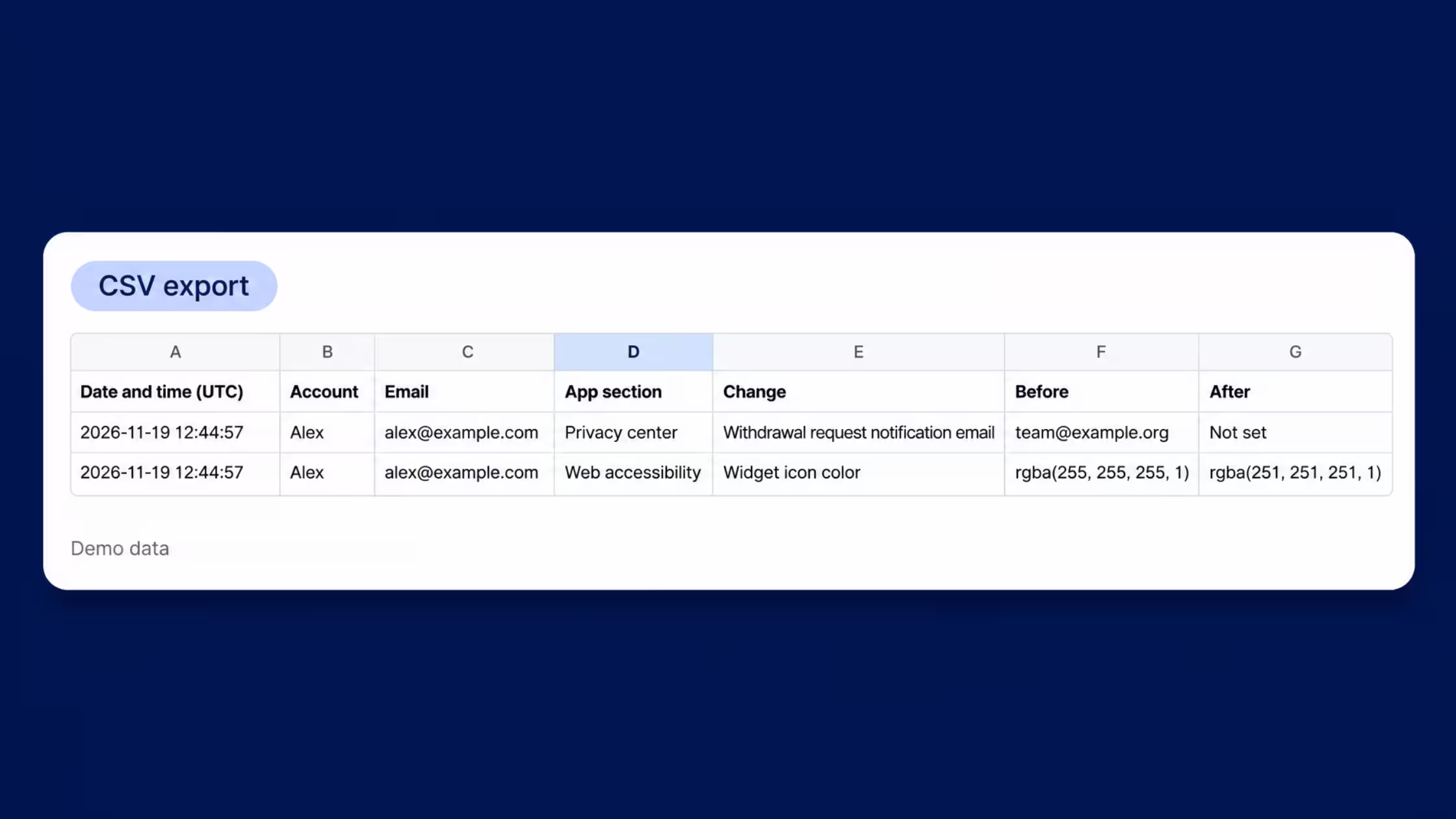
Select Export from the Activity Log screen to export your activity history for further review.
An export can be useful when you want to share a record with a colleague or keep a copy for an internal review. If a text value is shortened in the table, the expanded entry can indicate that the full text is available in the export.
When Activity Log is useful
After a cookie banner update
Suppose your team updates the banner wording and later needs to check what was changed. Open Activity Log, find the banner text entry, and expand it to review the supported before-and-after details.
You can then check the current banner settings and decide whether any further changes are needed.
When a banner status looks different
If your banner status is not what you expected, the log can help you identify a recorded status change and its associated account and time. Where supported, the expanded entry shows the previous and updated status.
After reviewing the entry, check your current settings before making another change.
When several people manage the app
Store owners, staff, and other people with access may work in Consentmo at different times. Activity Log gives the team a shared reference for recorded app activity, with the account and section shown on each entry.
When you review your setup
Activity Log can add context to an internal review of your Consentmo configuration. It helps you see the changes recorded in the app, while other reports and checks serve different purposes.
For a view of how your banner behaves on the live storefront, see Consent Monitoring: Test Your Live Cookie Banner. Consent Monitoring checks banner display and tracker behavior on the live store. Activity Log shows recorded app activity.
What to know before you start
Availability: Activity Log is available on the Max plan.
Recording start date: Activity recording starts from the feature’s activation date. Changes made before recording began are not available in the log.
Before-and-after details: These are available for supported settings. Expand an entry to see whether it includes a comparison.
Time display: Activity times follow your Consentmo timezone setting.
Scope: The log provides a history of recorded app activity. Review your current settings and use the relevant Consentmo reports or storefront checks when you need a fuller picture.
When a question comes up about your Consentmo settings, it helps to have a place to start. Activity Log lets you look back at recorded changes, see the account associated with each one, and check the details available for supported settings.