TLDR
- Consentmo Tracker Manager scans your storefront for cookies, scripts, pixels, beacons, and local/session storage, then helps you categorize everything for GDPR, CCPA/CPRA, and similar laws.
- AI suggests categories for unclassified trackers, you keep full manual control, scheduled scans catch new apps and tags, and results feed your cookie banner preferences tab and Smart Cookie Policy.
- If you still think of compliance as “list the cookies and move on,” this guide shows what modern tracker management looks like inside Consentmo, and how to run it without slowing growth.
What is Tracker Manager by Consentmo?
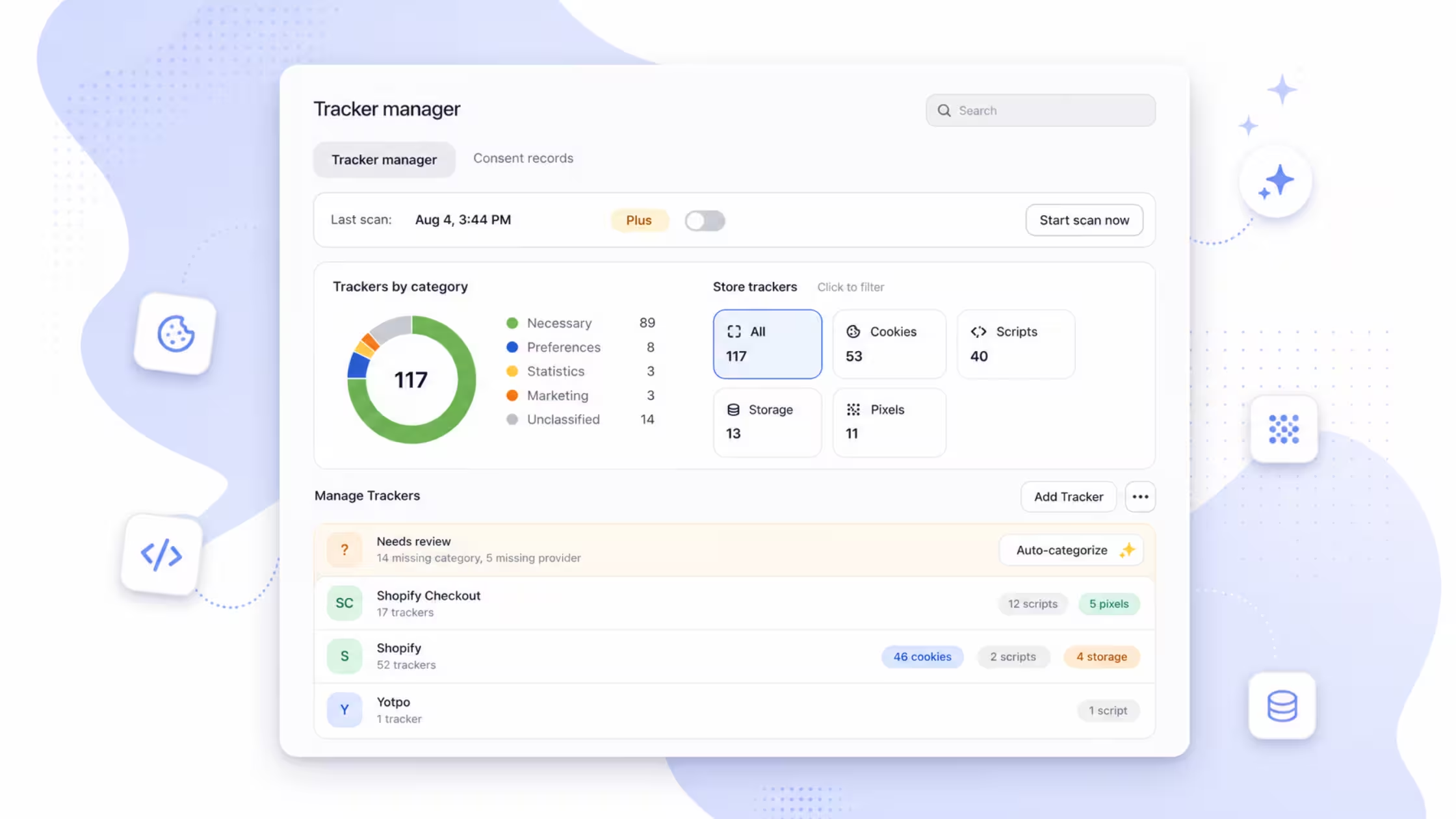
Tracker Manager is Consentmo’s in-app command center for everything that can track or store data on your Shopify storefront. One scan surfaces the full inventory, not only classic cookies.
A typical scan groups findings into types such as:
- Cookies, first- and third-party cookies from Shopify, apps, and external tools
- Scripts, JavaScript loaded by your theme or apps that may collect data
- Pixels & beacons, hidden trackers (ads, analytics, heatmaps, app pixels)
- Storage,
localStorageandsessionStorageentries that persist beyond a single page view
Results also roll up by consent category (Necessary, Preferences, Statistics, Marketing, plus unclassified) so you can see compliance risk at a glance.
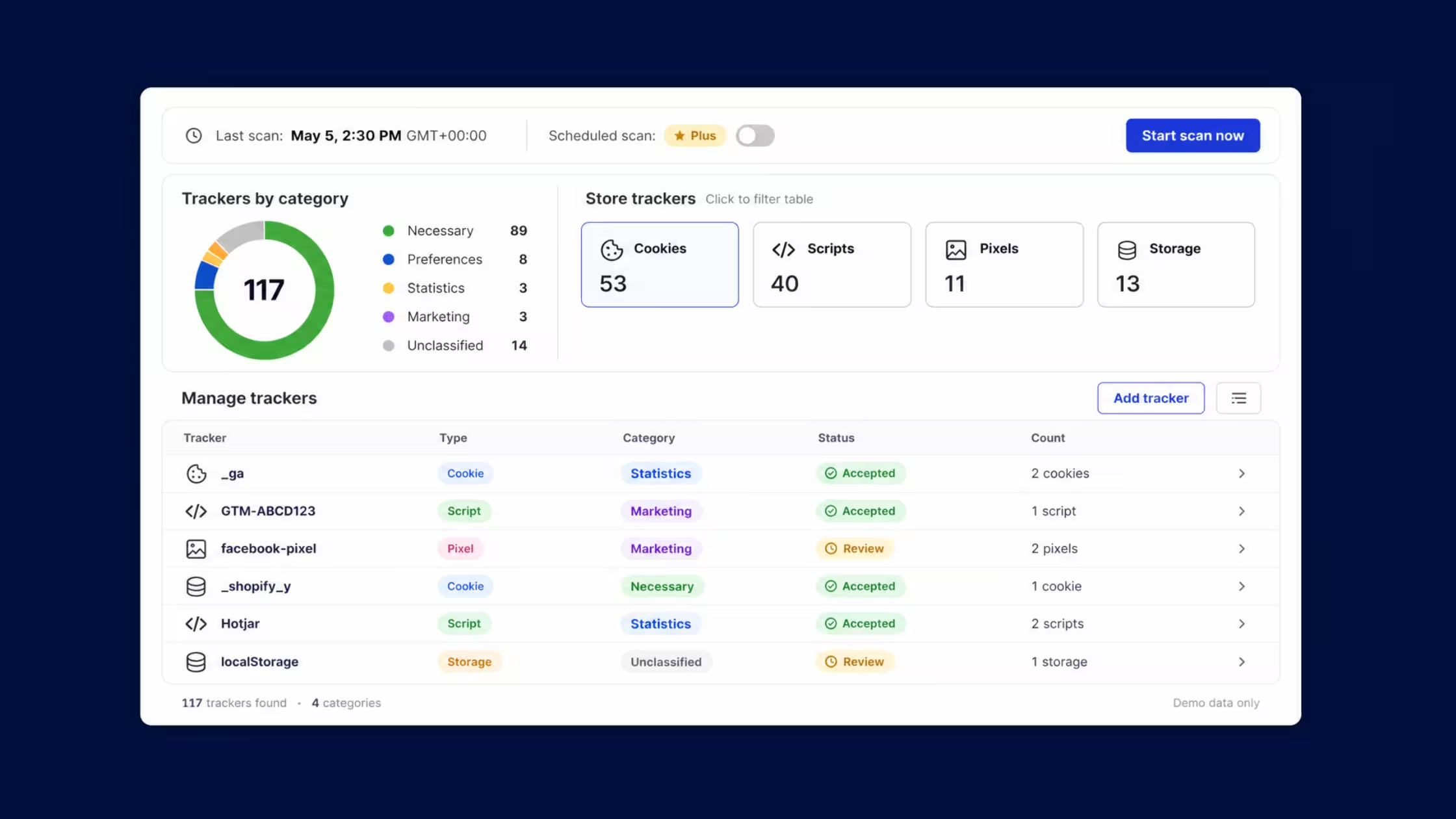
That inventory is the source of truth for:
- what visitors see in the cookie banner Preferences tab
- what you disclose on your cookie policy page
- what you block or allow based on consent
Why cookie-only thinking fails on Shopify
Regulators and customers care about tracking technologies, not only the Set-Cookie header. On a live Shopify store, trackers appear when you:
- install or update a Shopify app
- add Meta, Google, TikTok, or other ad pixels
- drop a chat, reviews, or personalization script into the theme
- embed third-party media or widgets
- change theme code or app blocks
Many of those tools write cookies. Others rely on script tags, pixels, iframes, or browser storage. If your “cookie list” only shows cookies, your banner, policy, and blocking rules can miss half the story.
Consentmo’s feature page puts it simply: run a scan to see every cookie, script, pixel, and tracker, then auto-categorize them for transparency and compliance.
How the Tracker Manager scan works
1. Full storefront crawl
From Cookie banner → Tracker Manager, start a scan. Consentmo crawls the storefront and detects cookies, script tags, pixels, storage entries, and related trackers, first-party and third-party.
2. Inventory by type and category
You get totals and breakdowns (for example cookies vs scripts vs storage vs pixels) plus category splits so unclassified and marketing-heavy stacks stand out quickly.
3. AI categorization with manual override
After the scan, AI reviews unclassified items and suggests Necessary, Preferences, Statistics, or Marketing based on how each tracker behaves. You can edit provider details, change categories, or add trackers yourself at any time. AI speeds the busywork; legal judgment stays with you.
4. Scheduled scans
Stores change constantly. Schedule daily, weekly, or monthly scans so new apps, campaigns, and theme edits surface before they become silent compliance debt. Scheduled runs also support keeping Smart Cookie Policy aligned with the latest inventory.
5. Banner preferences and reporting
Trackers from the scan can appear in a rich Preferences experience on your cookie banner, so visitors see what actually runs. Scan history and exports help you show auditors (and your own team) how the stack looked over time.
Install Consentmo and run a scan >
Reading the tracker table (what each field means)
When you open detailed results, treat each row as a compliance record, not a developer curiosity.
The four consent categories, in store language
Tracker Manager exists so these labels map to real technologies on your store, including non-cookie trackers that still need a category.
AI categorization without giving up control
Consentmo’s AI path is built for merchants who do not want to hand-label dozens of unknown keys after every app install:
- AI checks unclassified trackers after a scan
- category suggestions apply so the inventory moves toward complete
- you can still edit anything manually, including provider name, duration, and category
.avif)
Free includes limited scanning; paid plans unlock unlimited scans; advanced options such as scan scheduling, AI categorization, and export/import sit on Plus and above. Always confirm current plan cards in-app before you quote pricing internally.
Why scheduled scans beat one-off audits
A single scan on launch day goes stale the first time someone adds a pixel for a sale. Scheduled Scanner runs in the background on the interval you choose (daily, weekly, or monthly), timestamps activity, and helps keep disclosures current, including auto-updates for Smart Cookie Policy when that feature is enabled.
Practical cadence:
- After every major change, new app, new ad account pixel, theme overhaul
- Weekly, active stores with frequent app and campaign changes
- Monthly, quieter catalogs with a stable stack
Quarterly-only reviews are a weak fit for stores that ship marketing changes every week.
From scan → banner preferences → cookie policy
A scan only creates value if shoppers and regulators can see the truth.
- Preferences tab, surface trackers in a clear, navigable preferences UI so people can control non-essential categories.
- Blocking rules, use categories so marketing and statistics tools wait for valid consent where the law requires it. Risky early-firing pixels are exactly what scanners help you catch.
- Smart Cookie Policy, generate a storefront cookie policy from scan data and keep it updated as the inventory changes, instead of pasting a frozen HTML table once a year. See the Smart Cookie Policy feature and the deeper guide on what a cookie policy is.
Compliance, performance, and trust
Regulatory risk. Common audit failures include undeclared trackers, marketing tags before consent, and wrong categories. A living inventory reduces those gaps.
Performance. Old apps leave ghost scripts and storage keys. Finding unused trackers after scans can cut third-party weight and help Core Web Vitals, not only legal posture.
Trust. Clear categories, real preference controls, and an honest policy signal that privacy is operational, not decorative. That supports opt-in quality and brand confidence over time.
Get started
- Open Consentmo → Cookie banner → Tracker Manager.
- Run a full scan and review unclassified items with AI suggestions.
- Fix any mislabeled marketing or statistics tools.
- Turn on a schedule that matches how often your stack changes.
- Confirm the Preferences tab and, on Enterprise, wire Smart Cookie Policy to the same inventory.
Scan your Shopify store with Consentmo >
Conclusion
Strong cookie management on Shopify means knowing every tracker your store loads, putting each one in the right consent bucket, and refreshing that picture as apps and campaigns change. Tracker Manager gives you the scan, the AI assist, the schedule, and the path into banner preferences and Smart Cookie Policy, so compliance stays tied to what the storefront actually does.
Run a scan, clear the unclassified list, and set a cadence you will keep. That is how transparency stays real for shoppers and audit-ready for you.